Read time: 3 Min
OST or Offline Storage Table files are created by Outlook when we use Outlook in an Exchange Server environment. The Outlook OST file is linked to the profile that was used to create it and can be accessed only with the original Outlook profile. These OST files keep an offline copy of the mailbox data and are used when the Exchange server connection is not available. Once the connection is established, the changes made are synchronised with the Exchange Server mailbox.
Amazon Web Services (AWS) offers an email and calendar service named Amazon WorkMail. It is basically designed for business personnel who are looking for a secure and reliable system that helps them communicate in a safe environment. Unlike other email services, AWS offers strong security, encryption, and integration with many applications.
Nowadays, users prefer to use cloud-based email clients for better accessibility, which is why users migrate from Outlook to Amazon WebMail. To access Outlook emails in WebMail, users need to import OST file to Amazon WorkMail. Let us learn the detailed methods to perform the migration, but let’s first focus on various reasons why users prefer Amazon WorkMail over MS Outlook.
Why Users Import OST File to Amazon WorkMail?
Here are the common reasons why users migrate from Outlook to Amazon WorkMail:
- Everyone is moving to a cloud environment to be able to access data from anywhere, which is why user chose to move to Amazon WorkMail so that they can access emails from anywhere, anytime.
- The OST file is tied to the Outlook profile; once the Outlook profile is deleted, the emails in the OST files become inaccessible. Moving them to the cloud saves users from information loss.
- Managing OST files in the Exchange environment requires sound technical knowledge, while it’s easy to manage emails in Amazon WorkMail.
We have learned why there is a need to import OST file to Amazon WorkMail. Let us now focus on various methods to perform OST conversion.
Manual Method to Import OST File to WorkMail
Amazon WorkMail doesn’t support importing an OST file, but you can import a PST file easily, so users have to convert OST to PST first, then import the PST to Amazon WorkMail.
Step 01: Convert OST to PST
- First of all, open MS Outlook.
- Now go to the File option and choose Open & Export.
- Click the Import/Export option.
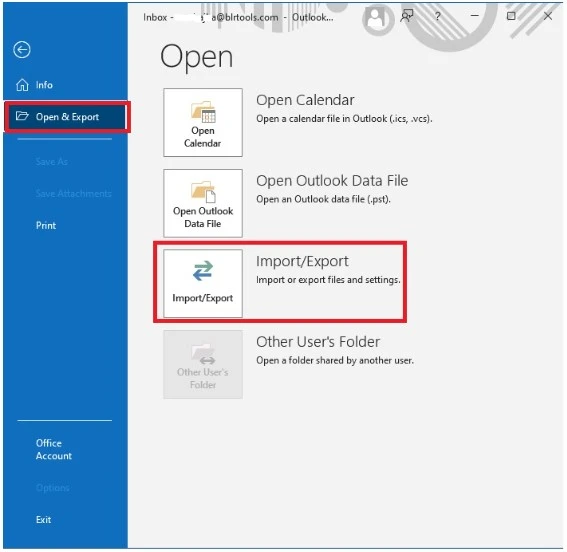
- Select Export to a file and then Outlook Data File (.pst).
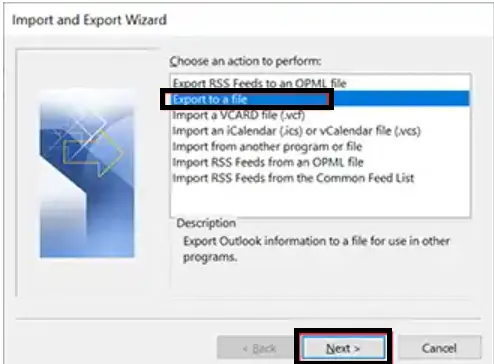
- Now select the folders you want to export.
- Save to the desired location.
Step 02: Migrate PST to Amazon WorkMail via Outlook
- Now add your Amazon WorkMail account to Outlook using IMAP settings.
- Now, click the File option and choose Open & Export > Import/Export.
- Choose Import from another program or file.
- Select the PST file you exported.
- Finally, import the data into your Amazon WorkMail mailbox.
The manual method requires the original Outlook profile for exporting OST emails to PST format.
Automated Tool: BLR OST Converter Tool
The manual method suggested above works only on a healthy OST file and with the original Outlook profile. If the Outlook profile is not available or your OST file is corrupt or damaged, you need the help of a good professional software for OST file recovery. With BLR OST to PST Converter, you can easily complete the OST to Amazon Workmail migration in a few simple clicks. This tool will import emails from an inaccessible OST file without any data loss. Use this tool and import OST file from Outlook 2021/2019/2016 and all other older versions.

Why Use an Automated Tool for Migration?
With the use of an automated tool for OST to WebMail migration user has various advantages like:
- Directly import OST emails to Amazon Workmail without any hassle.
- Migrate emails, contacts, calendar, and complete OST file data without missing out any information.
- Convert OST to PDF, CSV, MBOX, and many other file formats.
- Allow to import orphan, damaged, or corrupted OST files with ease.
- Smart preview option to view your emails before OST to Amazon WorkMail migration.
- Additionally, options to upload OST to Gmail, Office 365, and many other webmail accounts.
- You can choose email folders and subfolders and import them only.
- Also, fix corrupted OST files and migrate their mailbox data effortlessly.
- Date range filters to import emails from a specific time period.
- If there are duplicate emails in OST file, then this tool will delete them before importing them.
- A free demo version is also available to see how the tool works.
Conclusion
Here, in this blog, we discussed the best practice to import OST emails to Amazon Workmail with ease. Since the manual method has major drawbacks, like it doesn’t work on corrupted OST files and the chances of data loss are high, using a professional tool is the safest option. To analyze how the process works, you can use the demo version of the software to learn the complete process.