BLR Google Takeout Converter Tool
An efficient tool to convert Google Takeout archive file to different major formats
BLR Google Takeout Converter is the best solution to convert Google Takeout MBOX files to multiple formats for better accessibility. It can directly migrate your Gmail archive files to multiple email accounts with ease.
- Convert Google Takeout emails to PST, PDF, CSV, EML, and other formats
- Support converting multiple Google Takeout files at once without data loss
- Directly migrates Google Takeout to Office 365, Gmail, and IMAP accounts
- Smart preview option to view Google Takeout emails before converting
- Option to convert selective email folders and avoid unwanted conversion
- Dual mode option to convert Google Takeout files and entire folder
When to Use
BLR Google Takeout Converter
Migrate Takeout Data to Outlook
Google Takeout is used by users to backup Gmail emails that can be extracted in MBOX files. However, if you want to import Google Takeout to Outlook, then you must know that Outlook doesn't support the MBOX file. Thus, first you need to convert Google Takeout MBOX to PST file, then import it to Outlook.
Migration to Another Email Client
Sometimes, users want to migrate their emails to other email clients to access their emails on different platforms. Using this tool, you can easily migrate Google Takeout to Thunderbird, Apple Mail, and many other email clients. This tool makes the migration for you easy and effortless.
Offline Access Gmail Emails
BLR Google Takeout Converter allows users to create secure backups of their Gmail emails by converting them into formats like PDF, PST, or EML. This helps users store important email data locally and access it anytime without needing an internet connection.
Verified Expert Reviews
BLR Google Takeout Converter
Google Takeout Converter tools are valued for their ability to process multiple MBOX files in batch and preserve email formatting, attachments, and folder hierarchy during conversion.
Google Takeout archives are usually stored in a large MBOX file that is not universally supported. This Google Takeout Converter simplifies converting the data file with complete data.
Quick Steps to Use
How to Use BLR Google Takeout Converter Tool?
Step 1: Install and launch BLR Google Takeout Converter on your system.
Step 2: Click on the Add File or Add Folder option to upload the Google Takeout MBOX files.
Step 3: Preview the selected email folders and choose the emails you want to convert.
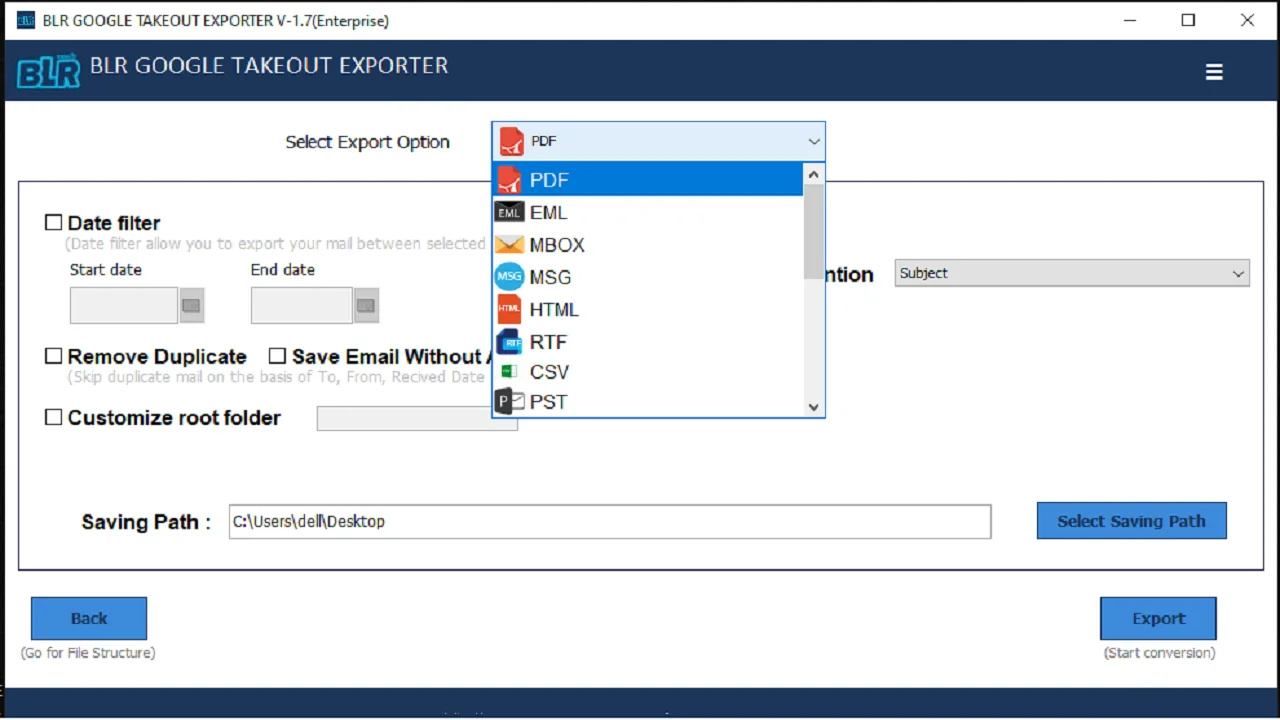
Step 4: Select the desired options in which you want to export Google Takeout emails.
Step 5: Choose the destination location and click the Convert button to start the conversion process.
Key Features
BLR Google Takeout Converter
Convert Google Takeout MBOX to Multiple Formats
If you want to save your Google Takeout data in different formats, then this tool converts your emails. With this software, you can convert Google Takeout to PDF, CSV, EML, and many other file formats. This makes your Google Takeout file data accessible across different email platforms and document formats.
Bulk Conversion of Multiple Files
With BLR Google Takeout Converter, you can easily convert multiple files at once without any data loss. With this feature, you can easily export multiple Google Takeout files into multiple formats and email accounts. Batch conversion saves your time and reduces manual effort when migrating large mailbox data.
Maintains Email Data Integrity
While converting emails, the first concern is the integrity of data. This converting tool maintains the original formatting and structure of the Google Takeout file while converting it. It will preserve email key elements and attributes, sender info, attachments, interlinking, signature, and other information.
Preview Emails Before Conversion
With this tool, there is an inbuilt preview feature that helps you to view your emails before converting them. With the preview feature, you can quickly navigate through different folders and emails to confirm the selection, making the conversion process more accurate and reliable.
Maintain Folder Hierarchy
BLR Google Takeout Converter will maintain hierarchy and folder structure while converting your emails. All email folders and subfolders remain organized after conversion. It will make it easy for you to find and manage your emails in case you plan to migrate the data file to other platforms.
Google Takeout & MBOX Support
The software supports Google Takeout files as well as MBOX files from other email clients. If your MBOX file is exported from Thunderbird, Apple Mail, and other email clients, this tool will effortlessly convert and migrate its emails without any hassle or data loss. This flexibility makes the tool useful for you in version migration scenarios.
Selective Conversion
Using the BLR Google Takeout Converter, users have the option to convert all data or to convert only selective emails/folders. This saves a lot of time for the user and minimizes the effort taken to manage large Google Takeout data.
Save Output at Desired Location
BLR Google Takeout Converter provides users with the option to save the converted file to a desired location using the Browse button. If you don't choose any location, the converted files will be saved to the desktop by default.
Free Trial Version
With the free trial version, users can check the working of the software. The free trial version allows users to scan the Google Takeout file, preview the emails and other items, and save 15 items from each folder to a desired location.
Minimum System Requirements
Requirements to Install BLR Google Takeout Converter Tool
 About Product
 System Requirement
 Documents
 About Product
BLR Google Takeout Converter
| Version: | 1.7 |
| Edition: | Personal, Business, & Enterprise |
| Language Supported: | English |
| Release Date: | Mar, 2026 |
 System Requirement
System Requirement
| Processor: | Intel 4.2 GHz or i3 6th Gen 2.4 GHz or higher recommended |
| Memory: | 4 GB recommended (2 GB minimum) |
| Hard Disk: | 500 MB for installation files |
| Operating System: | Windows 11, 10, 8.1, 8 and earlier versions |
 Documents
 Installation / Uninstallation
 User Manual
 Knowledge Base
Software Feature Comparison
Demo vs Licensed: BLR Google Takeout Converter Tool
| Software Features | Trial Version | Paid Version |
|---|---|---|
| Maintain Folder Structure | ✔ | ✔ |
| Google Takeout Email Preview | ✔ | ✔ |
| Selective Export | ❌ | ✔ |
| Batch Conversion | ❌ | ✔ |
| Email Filters | ❌ | ✔ |
| Delete Duplicate emails | ❌ | ✔ |
| Migrate Google Takeout File | 15 emails per folder | All emails |
| Convert Google Takeout to Different Formats | 15 emails per folder | All emails |
| Free Download | Buy now |
Quick FAQs
Quick Answers Related to BLR Google Takeout Converter
Yes, this tool supports both large and bulk email conversion from Google Takeout file.
Yes, this utility will convert your Google Takeout emails with attachments.
Yes, with this tool, there is a date rate filter and convert emails from any particular time.
Yes, after adding the Google Takeout file, you can choose the folders and convert the selected ones.
Yes, with this tool, you can easily migrate Google Takeout emails to Office 365, Gmail, and IMAP accounts.
Yes, it comes with a free trial version for checking out the functionalities of the software and saving 15 items from each folder to check results.
Yes, you can convert emails from Google Takeout to Outlook PST format easily with this tool. At the Output option, you have to select PST.
Yes, the software supports Windows 11, and other previous versions, be it a 32-bit or 64-bit OS.
What Customers Say About
BLR Google Takeout Converter Tool
Sarah Thompson
16.03.2026
What impressed me most about this tool is the batch conversion feature. I had multiple Google Takeout files, and the tool converted them all at once without slowing down my system.
Robert Lewis
15.03.2026
BLR Google Takeout Converter saved me a lot of time when I was migrating Gmail archive file. The software maintained a folder hierarchy and attachments, which were extremely important for my organization.