BLR PST Repair Tool
Repair Corrupt Outlook PST File & Recover Emails
BLR PST Repair Tool scans the corrupted PST file and recover emails, contacts, calendars, notes, etc. It is the best Outlook PST recovery tool to repair PST file without affecting data integrity, folder structure and email key elements.
- Repair inaccessible, damaged, or corrupted PST files in a few clicks
- Supports repairing password-protected PST file
- Repair multiple damaged, corrupted, or inaccessible PST files simultaneously
- Split the repaired PST file into smaller PST files, based on size, date, etc.
- Preview mode to view emails from a corrupted PST file before recovering them
- Remove duplicate items while saving the repaired PST file
- Advanced filter options to save emails from a particular folder or from a specific period
- Maintain the folder and sub-folder hierarchy when repairing a corrupted PST file
- Export PST file directly to Office 365, Exchange Server, or iCloud
Who Should Use It?
Best Scenario to Use BLR PST Repair Tool
Outlook fails to open PST file
When Outlook is unable to open a PST file, users often see errors like “Outlook Data File Cannot be Opened”; this is due to a corrupted PST file. In that case, you can use the tool to repair PST file without missing a single bit of data.
Windows 11 KB5074109 Update Issue
If updating Windows 11 to KB5074109, some users face Outlook performance issues or PST file accessibility problems. This BLR Outlook PST Repair Tool helps you in repairing the affected PST file and creating a new and healthy data file.
When ScanPST.exe Fails to Fix Problem
Microsoft Inbox Repair Tool (ScanPST.exe) has limitations as it fails to repair severely corrupted and oversized PST file. This PST Repair tool handles highly corrupted or damaged PST file with ease and restores the data. Also, there will be no file size limitation when repair Outlook PST file.
What Experts Say About
Free PST Repair Tool
BLR PST Repair Tool accurately repairs corrupted PST file into a healthy file. Most importantly, it maintains your mailbox folder structure and hierarchy. It saves OST emails with attachments, making it a reliable choice for Outlook PST file recovery.
I tested this tool on a large and damaged PST file, it works smoothly. This PST Repair Tool delivered accurate results with no data loss. Simple, fast, and effective.
How to Repair PST File
With BLR Outlook PST Repair Tool
Step 1: Open this PST Repair tool on your Windows.
Step 2: Then, click on the “Add File” and browse the PST file.
Step 3: The tool will show the complete folders of your data file.
Step 4: Click the folder from which you want to repair data.
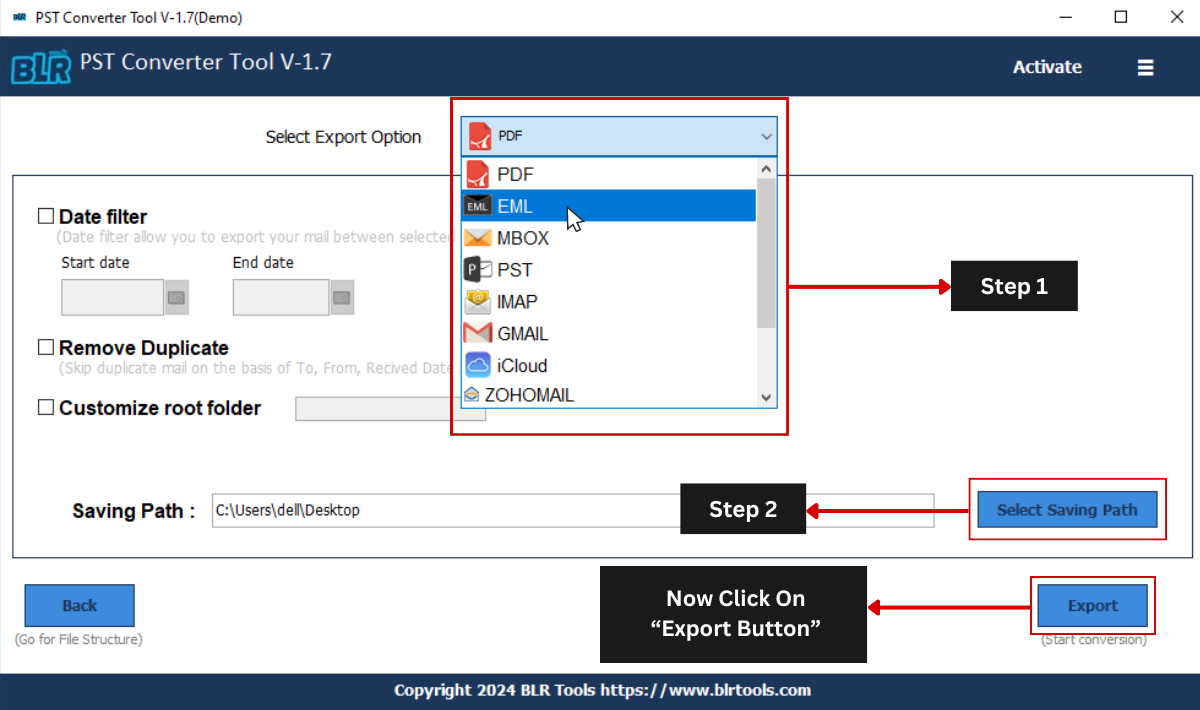
Step 5: Choose any file format from the given export list.
Step 6: Browse the location to save the exported data file and hit the Export button.
Key Features
BLR PST Repair Benefits
Repairs Damaged PST File
BLR PST Repair Tool is a powerful tool to repair Outlook PST file that are damaged, corrupted, or inaccessible due to oversized mailboxes or Outlook crashes. This tool is an ideal solution for both basic corruption and severely corrupted PST files.
Smart Preview Mode
With this PST Repair tool, there is an option to view your PST file data. After scanning the corrupted PST file, you can view emails, attachments, contacts, calendars, and other data in a structured tree view, same as Outlook.
Selective Folder Recovery
PST file contains the complete mailbox data; however, users prefer to recover the important data only. For selective folder recovery from the corrupted PST file, you can choose the email folder and recover data from those folders.
Multiple Export Options
BLR Outlook PST Repair Tool offers multiple export options that help users to save repaired mailbox data in the most suitable format. One can use the tool and convert PST to MBOX, PDF, CSV, EML, and many other file formats.
Remove Duplicates
With the PST Repair tool, users have the option to remove duplicate emails and other mailbox items while saving the resultant PST file. Its advanced algorithm easily detects duplicate items based on subject, sender, date, or content, which ensures the data is not redundant, reducing the overall size of the PST file.
Repair Large PST File
An oversized PST file is the reason for slow Outlook performance and data corruption. Use the Outlook PST Repair tool to repair large PST files of any size without any limitations. This tool will effortlessly split large PST file into smaller parts without any data loss.
Bulk PST File Repair
The user can repair a single PST file or add multiple PST files to perform bulk PST file repair without any hassle. Repairing multiple PST files simultaneously saves a lot of time without hampering the original properties and formatting of email items.
Repair Password-Protected PST Files
The software is capable of repairing password-protected Outlook PST files while maintaining data integrity. It can access a protected PST file and recover emails, contacts, calendars, notes, etc., and other mailbox items easily.
Date Range Filter
The date range filter feature allows users to recover mailbox data from a specific period of time. This Outlook PST file repair tool gives you the option to specify the start and end date that will help in excluding outdated data when recovering a PST file.
Export PST to Office 365
The software provides users with the option to export PST file data directly into Office 365 mailboxes. You just need to provide Office 365 account credentials, and the rest is handled by the software. This export PST to Office 365 feature makes it an ideal choice for users looking to migrate PST to a cloud environment.
Transfer PST File to Web-Based Email Clients
Repair the PST file and transfer data directly into Gmail, Yahoo Mail, Outlook.com, AOL, and other IMAP-supported email clients. This process ensures the safety of data while maintaining the original formatting and properties of email items.
Free PST Repair Tool
Users can explore the functionalities of the PST Repair Tool with the free trial version. It allows users to save 15 emails from each folder to evaluate the results and other features.
Minimum System Requirements
Needs to Run BLR Outlook PST Repair Tool
 About Product
 System Requirement
 Documents
 About Product
BLR PST Repair
| Version: | 1.7.1 |
| Language Supported: | English |
| Release Date: | Dec, 2025 |
 System Requirement
System Requirement
| Processor: | Intel 4.2 GHz or i3 6th Gen 2.4 GHz or higher recommended |
| Memory: | 4 GB recommended (2 GB minimum) |
| Hard Disk: | 500 MB for installation files |
| Operating System: | Windows 11, 10, 8.1, 8 and earlier versions |
 Documents
 Installation / Uninstallation
 User Manual
 Knowledge Base
Software Feature Comparison
BLR PST Repair: Free Trial vs Paid
| Software Features | Trial Version | License Version |
|---|---|---|
| Scan Corrupted PST | ✔ | ✔ |
| Support Password-Protected PST File | ✔ | ✔ |
| Maintain Folder Hierarchy | ✔ | ✔ |
| Filtering Options | ✔ | ✔ |
| Preview PST File Items | ✔ | ✔ |
| Split PST File | ❌ | ✔ |
| Save Repaired Emails | 15 emails/folder | Unlimited |
| Import PST to Webmail Accounts | 15 emails/folder | Unlimited |
| Free Download | Buy Now |
FREQUENTLY ASKED QUESTION
Answers to Your Questions
Yes, this Outlook PST repair tool effortlessly repairs data from a large, corrupted PST file.
No, Outlook installation is not required to run BLR PST Repair Tool.
No, there will be no modification when using this tool to repair PST file.
Yes, using this tool, you can convert PST emails into multiple formats, including PDF, CSV, EML, and many others.
Yes, with this tool, you can migrate emails from a corrupted PST file into various webmail accounts such as Gmail, Office 365, Exchange Server, and many more.
Yes, this Outlook PST file repair tool effortlessly repairs a large, corrupted, or damaged Outlook PST file.
Yes, there is no need to install Outlook to repair the PST file with this tool.
No, there will be no modification when using this tool to repair the PST file. Still, it is suggested to make a copy of the PST file before trying to repair the PST file.
Yes, using this tool, you can convert PST emails into multiple formats, including HTML, RTF, TXT, MBOX, PDF, CSV, EML, and many others.
Yes, with this tool, you can migrate emails from a corrupted PST file into various webmail accounts such as Gmail, Office 365, Exchange Server, and many more.
Customer Experiences with
BLR PST Repair Tool
Daniel Thompson
18.01.2026
As an IT Administrator, I have tested multiple tools to repair my PST files; among those, BLR PST Repair Tool offers accurate and speedy repair. It successfully repaired the large PST file without affecting its structure. A reliable solution for Outlook users.
Michael Richard
12.01.2026
I had a severely corrupted PST file that Outlook couldn’t open. BLR Outlook PST Repair Tool recovered every single email, contact, and calendar entry with perfect folder structure. A lifesaver!