BLR Outlook Toolkit
Trusted All-in-One Toolkit to Manage, Repair, & Convert Outlook OST/PST
Handle Outlook data files OST/PST, with a single, comprehensive toolkit. BLR Outlook Toolkit helps you to repair corruption, convert, and migrate Outlook files with ease.
- Convert Outlook emails into PDF, HTML, EML, MBOX, TXT, CSV, and other formats
- Repair corrupted or inaccessible Outlook files without data loss
- Convert orphaned, damaged, corrupted, or inaccessible OST file to PST
- Option to delete duplicate Outlook emails while converting
- Convert/migrate encrypted Outlook data files effortlessly
- Preview mode that allows you to read emails before conversion
- Split a large Outlook PST file into smaller parts with complete data
Recommended Scenarios
Ideal Scenarios to Use BLR Outlook Toolkit
Fix Data File Corruption
Use the BLR Outlook Toolkit when Outlook PST or OST files become corrupted due to a system crash, abrupt shutdown, or oversized data file. This toolkit efficiently repair Outlook PST as well as OST file and restores emails, attachments, contacts, calendars, and other mailbox items, all while maintaining data integrity.
Need to Optimized File Size
When the Outlook data file becomes too large, it affects Outlook performance or causes frequent shutdowns. BLR Outlook Toolkit helps optimize the size of the data file i.e. it will split large PST file into smaller parts. Similarly, it can split large OST file without affecting your data, reducing the risk of future corruption.
Need to Convert OST to PST
It is not possible to open OST file if the Outlook profile is deleted or not connected to Exchange; in that scenario, this tool helps. BLR Outlook Toolkit effortlessly convert inaccessible OST files to PST in a few simple clicks. It also supports converting orphaned, damaged, or corrupted OST file without affecting your important data.
Expert-Verified Review
BLR Outlook Toolkit: Insights from Experts
This toolkit simplifies advanced Outlook recovery and conversion processes while ensuring mailbox data remains intact and secure.
A one-stop solution to manage Outlook data, reduces manual effort, and improves productivity.
Easy Startup Process
Step-by-Step Guide to Use BLR Outlook Toolkit
Step 1: Download and install the BLR Outlook Toolkit on your system.
Step 2: Run the tool and add the Outlook data file (PST/OST).
Step 3: Preview mailbox items and select the email folders.
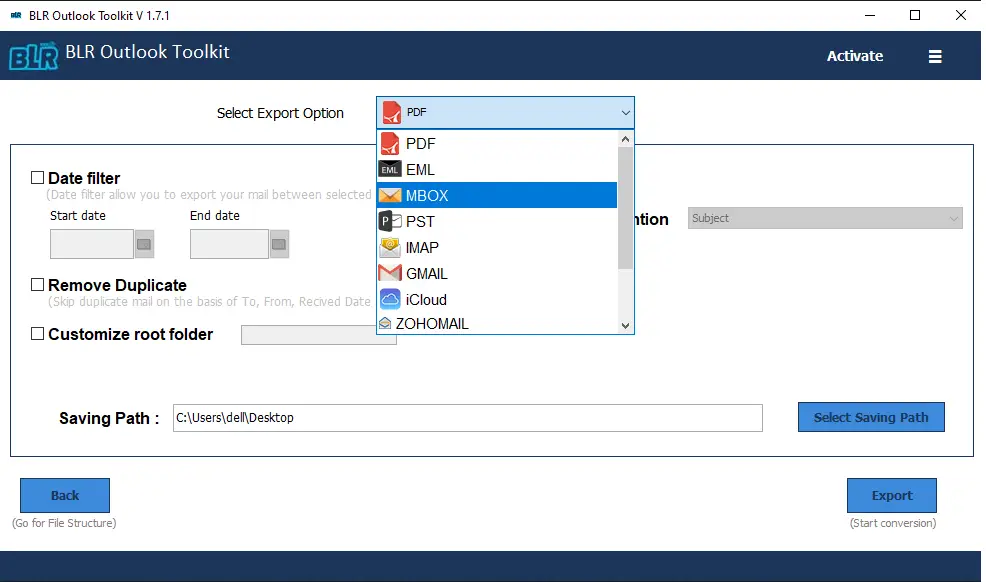
Step 4: From various export options, choose any file format or email account.
Step 5: At last, browse the saving location and hit the Export button to start the process.
Core Software Features
BLR Outlook Toolkit Features At Glance
Export Outlook Data Files
Using this tool, it is easy to export Outlook data files into various file formats, including PST, PDF, EML, CSV, HTML, TXT, MBOX, and many others. Most importantly, while converting this toolkit, preserve email structure, attachments, and metadata for secure backup or migration.
Fix Damaged Outlook Data Files
If your data file got corrupted or damaged, this tool will repair corrupted or inaccessible PST and OST files and create a new and healthy data file. All you need to do is add the file and choose PST as the export option; the tool will start fixing it.
Print Outlook Emails
If you want to print your Outlook emails, then this toolkit simplifies the process. It will export Outlook emails to PDF along with attachments, headers, and formatting intact for record-keeping, auditing, or legal documentation.
Eliminate Duplicates from Mailbox
Sometimes, there will be duplicate items present in the Outlook mailbox. This toolkit will identify and remove duplicate emails, contacts, calendars, and other mailbox items to reduce file size and improve Outlook performance.
Supports Selective Conversion
Outlook data files contain complete mailbox folders. With this tool, you can convert only the required emails, folders, or mailbox items. After adding the OST or PST file, the tool displays the complete folder hierarchy, selects the required email folder, and exports the important one.
Supports All MS Outlook Data Files
This Outlook Toolkit is compatible with all Outlook versions. Using it, you can convert an OST or PST file from Outlook 2024, 2021, 2019, 2016, and all other older versions. Additionally, it also works on all Windows OS versions.
Convert OST to PST
Use the BLR Outlook Toolkit to convert an Outlook OST file to a PST file. Convert OST to PST of any size without any limitation. Just add the OST file and choose PST as the output option to retrieve emails, contacts, calendars, etc from an inaccessible OST file.
Migrate Emails to Gmail account
The tool allows you to instantly move emails and other mailbox items into your Gmail account. It also supports moving emails to other web-based email clients like Yahoo, AOL, Outlook.com, iCloud, etc.
Migrate Mailbox to Office 365
Export Outlook OST or PST file items to Microsoft Office 365 directly using our Outlook toolkit. It supports the migration of emails, contacts, calendars, attachments, and other mailbox items. The folder hierarchy is maintained as original with complete data integrity.
Bulk Conversion
This tool includes a bulk conversion feature that converts multiple OST/PST files simultaneously. Therefore users don't have to convert each file one by one, saving precious user time and efforts.
Split PST File
Large PST files slow down Outlook and sometimes cause Outlook data file corruption. This tool provides users with the option to split a large PST file into smaller and more manageable files during conversion.
Free Conversion
BLR Outlook Toolkit comes with a free trial version that allows users to save 15 emails per folder. With the trial version, users can check the functionalities of the software and verify the results.
Pre-Installation Requirements
Everything Required to Run BLR Outlook Toolkit
 About Product
 System Requirement
 DocumentsAbout Product
BLR Outlook Toolkit
| Version: | 1.7.1 |
| Edition: | Personal, Business, Enterprise & Site |
| Language Supported: | English |
| Release Date: | July 2024 |
System RequirementSystem Requirement
| Processor: | Intel 4.2 GHz or i3 6th Gen 2.4 GHz or higher recommended |
| Memory: | 4 GB recommended (2 GB minimum) |
| Hard Disk: | 500 MB for installation files |
| Operating System: | Windows 11, 10, 8.1, 8 and earlier versions |
Documents Installation / Uninstallation
 User Manual
 Knowledge Base
Feature Comparison
BLR Outlook Toolkit – Free vs Paid Comparison
| Feature | Free Version | Full Version |
|---|---|---|
| Scan Outlook Files | ✔ | ✔ |
| Preview Data | ✔ | ✔ |
| Bulk Email Conversion | ❌ | ✔ |
| Repair Corrupted Files | ❌ | ✔ |
| Selective Data Export | ❌ | ✔ |
| Free Download | Buy now |
User Questions & Answers
Queries Related to BLR Outlook Toolkit
The toolkit contains different tools that help in converting. The software will convert OST and PST file data into different formats as well as migrate to webmail accounts.
Yes, the software is efficient enough to convert or migrate corrupted OST and PST file with ease.
Yes, the tool offers to select the email folders and convert/migrate them only.
This BLR Outlook Toolkit is compatible with encrypted or password-protected PST file and converts its data.
No, with this tool, there are no file size restrictions, allowing you to process large Outlook data files.
Yes, you can convert a corrupt, damaged, or inaccessible OST file to PST format with this tool.
When you use BLR Outlook Toolkit, you have the option to split the resultant PST file into smaller files based on size.
Yes, with the free trial version, one can convert 15 emails from each folder with the complete folder hierarchy to check the working of the software.
Real User Experiences
Why Users Trust BLR Outlook Toolkit
Robert Davis
08.01.2026
The Outlook Toolkit from BLR Tools provides a smooth, reliable way to manage Outlook data. From my personal experience, it accurately preserved emails and attachments, and the interface was easy to use. Overall, it’s a dependable solution for Outlook tasks.
Chris Gray
05.01.2026
What I liked most about this toolkit is that the tool supports both PST and OST files, making email migration to another service provider quick and hassle-free.