BLR Pen Drive Data Recovery Tool
Recover deleted and lost data from various pen drives
This best Pen drive recovery software is a powerful and safe solution to recover deleted data from any pen drive. It supports recovery from FAT, exFAT, and NTFS formatted pen drives and also recovers data from a formatted pen drive in a few simple clicks.
- Restore and recover deleted data or files & folder from the selected pen drive
- Effortlessly retrieve data/file/folder from the formatted pen drive sector
- Restore data from damaged, deleted flash drives in a few clicks
- Recover re-partitioned & lost partitions data from the pen drives
- Raw data recovery in case you lost data after all recovery modes
- Create a disk Image of a physical Pen Drive & save it as a virtual disk
- Supports the recovery of NTFS & FAT32 formatted pen drives
- Supports recovery of various file formats like MP3, MP4, JPEG, PNG etc
Ideal Scenario
When BLR Pen Drive Data Recovery Tool Works Best
Pen Drive Formatted Recovery
This tool can be used when your pen drive has been accidentally formatted and important files are lost. It scans the drive deeply and helps recover images, videos, document files, and other data even after formatting.
Recover Corrupted Pen Drive Data
If your pen drive has become corrupted or is not opening, BLR Pen Drive Recovery can help. This tool scans damaged USB drives and recovers files that are inaccessible due to corruption and recovers them all.
Recover Deleted Hard Drive Data
If you accidentally delete files or folders from pen drive, this tool can recover deleted hard drive data safely. It supports recovery from both internal and external hard drives, even after the recycle bin is emptied.
What Experts Say About
BLR Pen Drive Data Recovery Tool
I had a lot of choices when I was looking for software to get back data from a USB pen drive. The one that seemed perfect, though, was yours, and it was, because it got back all of my lost files from the pen drive.
It's excellent and quick to use, and you are able to recover your data from almost any device or situation. I've used it with SD and Pen Drive before, and it works great. The most impressive thing about the tool was that it could work with a variety of file types, such as pictures, videos, documents, and more.
Know How to Use
BLR Pen Drive Data Recovery Tool to Recover Pen Drive Data
Step 1: After installation, run the tool on your Windows.
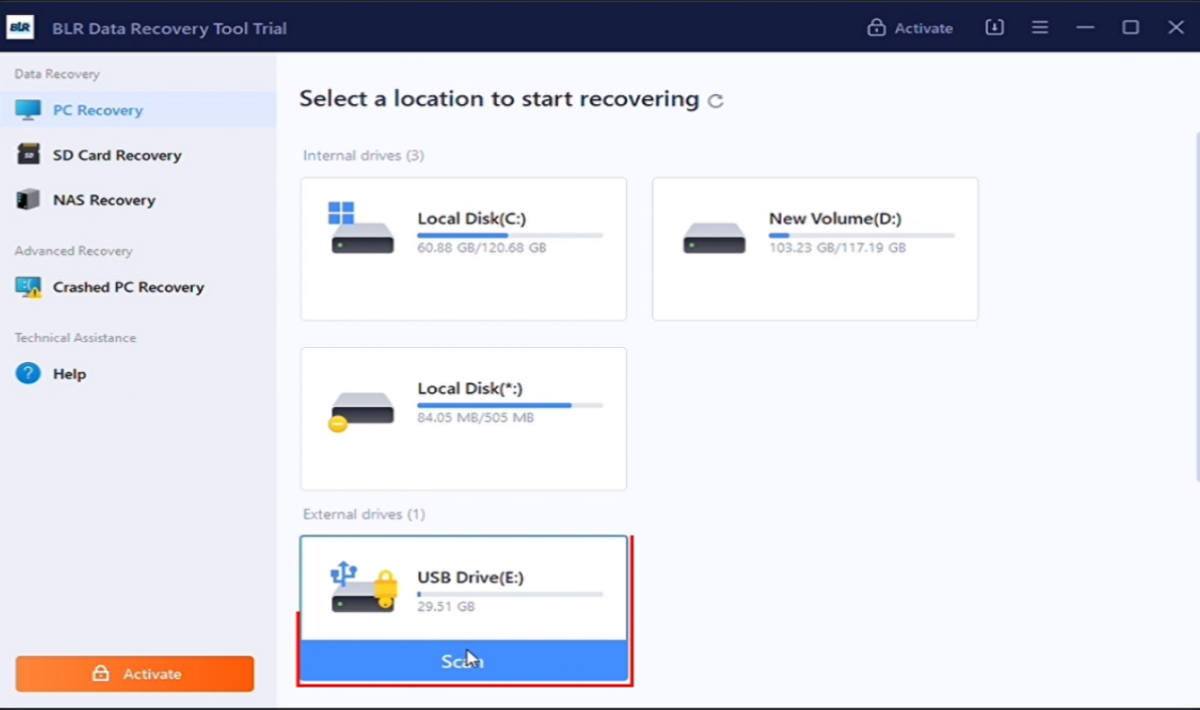
Step 2: From the sidebar, choose the PC Recovery option.
Step 3: Select your pen drive and click on the Scan button.
Step 4: The tool will start scanning your data, and you can view it.
Step 5: After the complete scan, select the folder that you want to recover.
Step 6: At last, click on Recover All and restore your deleted/lost data.
Extended Features of
BLR Pen Drive Data Recovery Tool
Recover Data from Encrypted Pen Drive (BitLocker)
The software will recover files from BitLocker-encrypted pen drives. It also restores data that is deleted, corrupted, RAW, or inaccessible. BLR supports encrypted USB drives and recover its content without compromising data security or integrity.
Formatted Pen Drive Recovery
Accidentally formatted your pen drive? BLR Pen Drive Data Recovery Software will helps you. It will deeply scan formatted pen drives to restore images, videos, documents, Excel, Word, PDFs, ZIP files, and more—even after format errors.
Recover Corrupted Pen Drive Data
If your pen drive is unreadable or corrupted, there are several potential causes, including improper removal, file system errors, or system crashes. This tool will scan damaged flash drives and safely retrieve recoverable files.
Overwritten File Recovery
Overwritten data is not easy to recover, but the BLR Pen Drive Data Recovery tool can do that for you. It will recover overwritten data drive info that includesWord, Excel, and other files using advanced recovery methods
Physically Damaged Pen Drive Recovery
This recovery tool helps recover data from pen drives that are showing hardware-related issues or malfunctioning behaviour. Connect the drive to your system and let this tool scan it and recover all the data files and other content.
Virus-Infected Recovery of Data
If your pen drive contains a virus that affects your data, BLR Pen Drive Data Recovery Software can still scan and recover lost data. After scanning, the tool shows all the files and gives the option to recover hidden and lost data with ease.
Recover Deleted Files
If you have intentionally or unintentionally deleted files from the pen drive, you can recover them with the BLR Pen Drive data recovery tool. This tool scans the Pen drive for deleted files and recovers all lost files within minutes.
Extract Selective Files
After scanning the drive thoroughly, the software lists all recoverable files in the software preview window. Users can select the files to recover by clicking on check boxes against each file. This helps to recover only the important files, leaving unwanted files, thus saving time and effort.
Support all Windows versions
BLR Pen Drive Data Recovery is a Windows-based software that supports its latest versions. It supports Windows 11,10, 8.1, 8, 7, and all previous versions. Successfully recover deleted or formatted data from a Pen/USB flash drive without any limitations on any Windows version.
Before You Install
Everything Required to Run BLR Pendrive Data Recovery Tool
 About Product
 System Requirement
 DocumentsAbout Product
BLR Pen Drive Data Recovery Tool
| Version: | 17.1.0 |
| Edition: | Personal, Business, & Enterprise |
| Language Supported: | English |
| Release Date: | Jan, 2024 |
System RequirementSystem Requirement
| Processor: | Intel 4.2 GHz or i3 6th Gen 2.4 GHz or higher recommended |
| Memory: | 4 GB recommended (2 GB minimum) |
| Hard Disk: | 500 MB for installation files |
| Operating System: | Windows 11, 10, 8.1, 8 and earlier versions |
Documents Installation / Uninstallation
 User Manual
 Knowledge Base
Feature Comparison of
BLR Pen Drive Data Recovery Tool: Trial & Full Version
| Software Features | Trial Version | Full Version |
|---|---|---|
| Scan & Detect Pen Drives | ✔ | ✔ |
| Preview Recoverable Data | ✔ | ✔ |
| Save Selected Items | Only Preview | ✔ |
| Free Download | Buy now |
FREQUENTLY ASKED QUESTION
Need Help? Find Answers Here
Yes, the tool will detect the pen drive and recover its deleted data.
The tool supports standard file systems like FAT, FAT32, exFAT, and NTFS, allowing recovery from most USB/flash drives.
Yes - this tool shows a preview of files found during scanning, so you can select only the ones you want to restore.
Use the tool and scan the pen drive. If you can't view any files, then try recovering them; it might work when restored.
No, those photos are still in your drive if it is not overwritten. Use the BLR Pen Drive Data Recovery tool and restore the deleted images.
Then, your pen drive is corrupted and you will need a recovery tool to retrieve them. However, if the pen drive is highly infected, then we suggest that you format it.
Yes, you can recover deleted photos from the Pen Drive with the BLR Pen Drive data recovery tool.
The time taken to recover data depends on the size of the data to be recovered. Most of the time, you will get a preview of recovered items on your screen within minutes.
Yes, the software comes with a free trial version that allows users to preview recoverable items and save up to 500 MB of data for free.
Yes, you can recover all types, be it a Doc, XLS, JPG, TXT, MP4, etc., from a formatted Pen drive provided that the Pen Drive is not used after the formatting is done.
Testimonials
User Experiences That Matter
Robin Milar
28.12.2025
After trying multiple options, I chose this software for flash drive recovery—and it didn't disappoint. All my lost files were recovered successfully.
Thomas Moser
10.12.2025
The software is fast, easy to use, and can recover data from almost any device or situation. I've personally used it on SD cards and pen drives, and the results were great.