Read time: 3 Min
Yandex is a powerful, feature-rich platform, popularly used in Russia. However, if you are planning to move your mailbox data, then it doesn’t offer a direct “upload” button for MBOX files. For all those users, this post covers the workarounds import MBOX to Yandex without any hassle.
Why Import MBOX to Yandex Mail Account?
There can be various reasons for moving to Yandex Mail, along with emails and other data from the MBOX file. Here are the common scenarios;
- You can easily manage large and multiple MBOX files in one place, i.e., Yandex Mail.
- This Yandex email service offer a modern, advanced, productivity, and user-friendly interface.
- You can save large-sized MBOX emails in Yandex Mail without any storage limitations.
- Yandex Mail reduces the possibility of unwanted emails, thus improving email management.
- It supports two-factor verification that secures users’ email data and accounts.
- When users switch MBOX files to Yandex, users don’t need to manage MBOX files manually. This email service automatically manages your emails, old emails, archive mails, etc.
How to Import MBOX to Yandex Mail Manually?
Here we will use Thunderbird to natively import MBOX emails to Yandex Mail via IMAP configuration. Let’s check out the instructions.
- Open Thunderbird and configure your Yandex Mail.
- Go to account settings > Account Settings > Add Mail account.
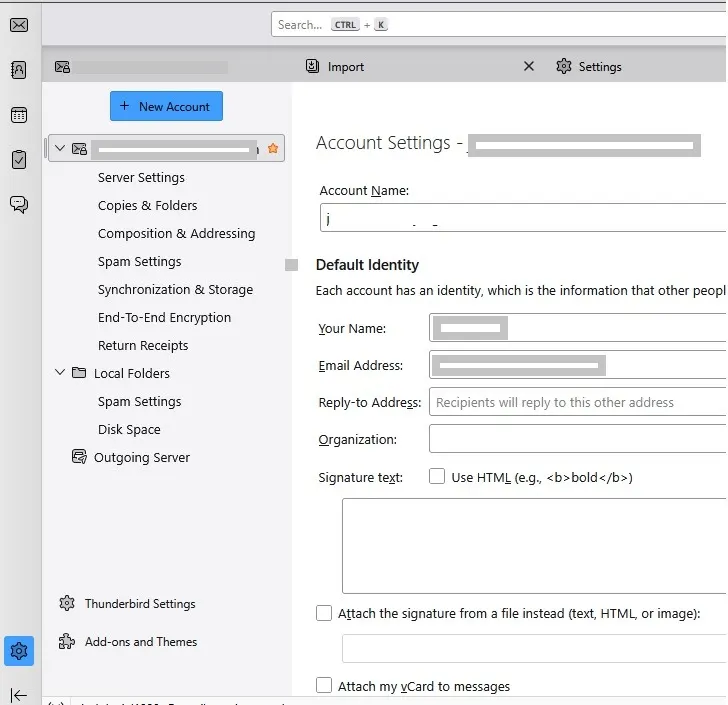
- Enter your Yandex Mail login details and let Thunderbird automatically configure it.
- After that, you need to open MBOX file in the Thunderbird mail account.
- Click on Import and upload the MBOX file that you want to migrate.
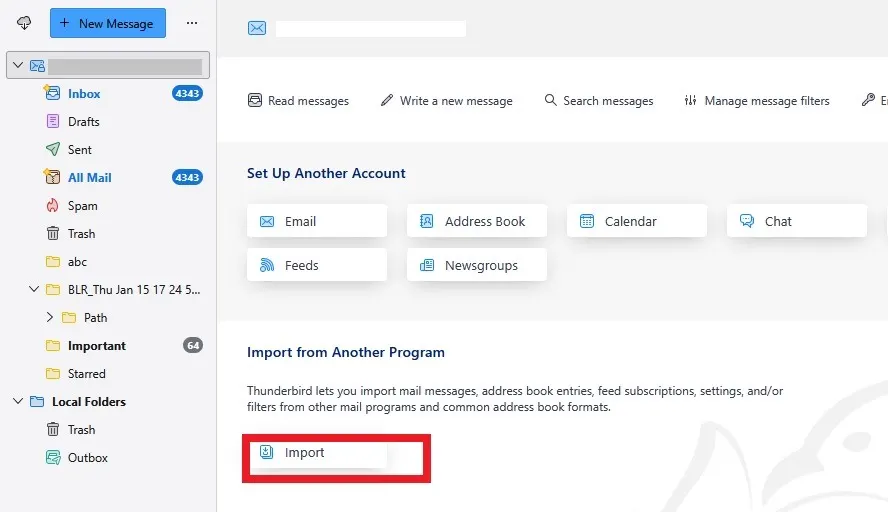
- After that, move the file to your Yandex Mail account.
Here are the manual steps for MBOX to Yandex Mail migration. However, the process takes a lot of time. You must set up Thunderbird first, and some technical knowledge is needed. The process can be slow, especially for large files, and you may also need another email account to complete it.
How to Import MBOX to Yandex Mail Automatically?
If you have a single MBOX file, then the manual method will work for you. However, to import multiple MBOX files into Yandex Mail, you can use the BLR MBOX Converter tool. MBOX to PST converter software will effortlessly migrate your MBOX emails along with attachments. Most importantly, when you import emails, this software preserves all the attributes and key elements.

Additionally, with its help, you can also migrate emails from MBOX to Gmail, MBOX to AOL, Office 365, Yahoo Mail, and all other webmail accounts. Try out the demo version of the software to know how it works.
Conclusion
This article covered all simple methods, tips, and recommended solutions to import MBOX to Yandex Mail account. Users can use the Thunderbird setup method to import MBOX files. The manual method is free but has some limitations that make the process challenging. On the other side, with BLR MBOX Converter, it is easy to import any size MBOX files into Yandex Mail.