Read time: 3 Min
Email migration can be difficult for many users. When moving emails from one system to another account, it’s important to use a safe and reliable method. Many users store their email backups in MBOX format, which contains multiple emails and attachments in a single file. If you have large MBOX files and want a secure way to import MBOX to AOL account, this updated blog will help you.
In this blog, you will learn simple methods, the reasons for conversion, and alternative solutions to migrate MBOX emails with attachments to an AOL account. It also provides a direct solution for easily importing MBOX emails into AOL Mail account.
Reasons to Import MBOX to AOL Mail
Here are some reasons and situations mentioned to help everyone understand why users need to import MBOX emails into AOL.
- Accessibility: AOL is a cloud-based solution. Users can access or view AOL emails anytime, anywhere, from any device.
- Security: Users can secure AOL emails by using two-step authentication.
- Better Email Management: After saving MBOX files to an AOL account, users can easily manage or sort according to their choice.
- Effortless Sync: AOL Mail can be synced on any device easily without downloading any email clients.
Manual Way to Import MBOX File to AOL Mailbox
- Run the Thunderbird application and add your Hotmail account to it.
- Click on Setting icon > Account Settings > Add Account.
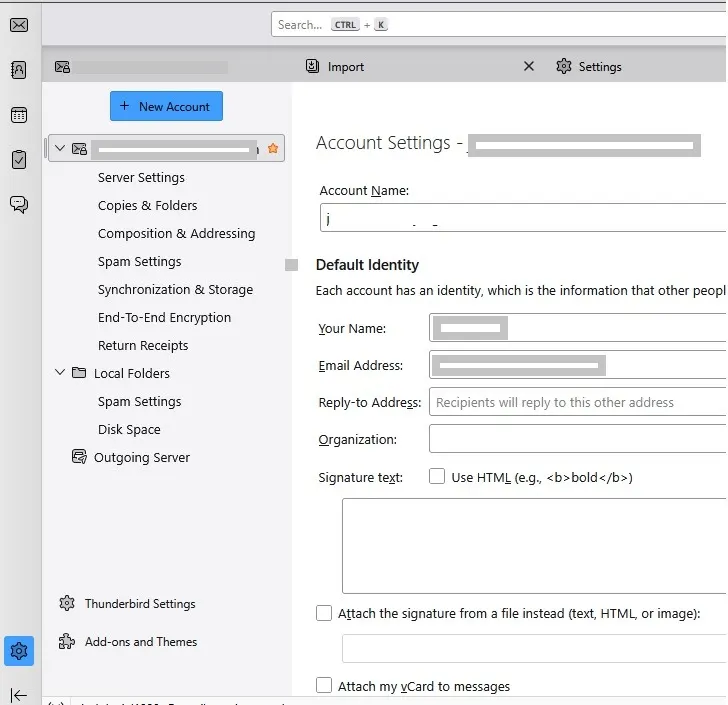
- Enter your AOL Mail login details and complete the configuration.
- Click on Import and import MBOX to Thunderbird account.
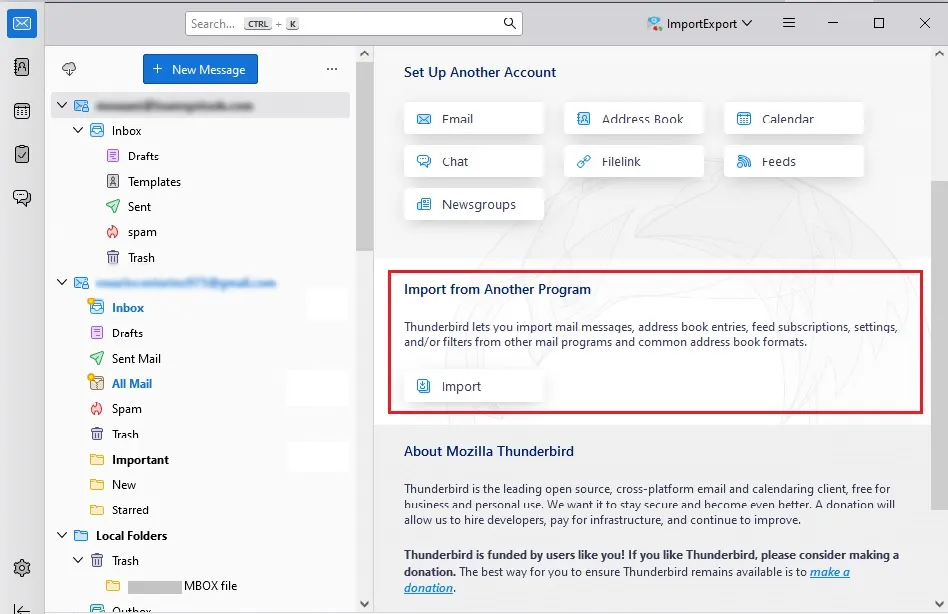
- Now, you right-click on the MBOX file you exported and move it to your AOL account.
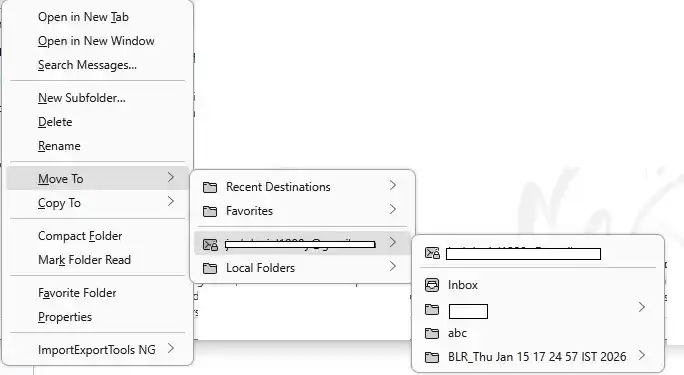
- After that, login to your AOL, and you will find the folder that has all your MBOX file data.
Here is the native way to migrate MBOX emails to AOL mailbox. However, when you try this approach, you can face a few setbacks.
- The process is time-consuming and requires technical knowledge.
- Need to install Thunderbird and other MBOX supporting applications and configure them with your AOL Mail account.
- Since it is not a direct import option in AOL, there is a risk of data loss during conversion.
- Attachments may not transfer properly.
- Not suitable for large MBOX files.
Direct Way to Import MBOX to AOL Mail in Bulk
When dealing with multiple MBOX files, importing them into AOL Mail manually can be risky. To avoid any hassle or data loss, it is better to use dedicated software. BLR MBOX Converter is a secure and efficient way to migrate MBOX emails to AOL Mail, along with attachments. Additionally, you can choose the important folders and import the selected ones only.

Moreover, there are various other features of MBOX to PST converter tool.
- Option to import MBOX to Office 365, Yahoo Mail, and all other IMAP servers.
- Filter option to import selective emails only.
- An email preview option to view emails before importing them.
- Also convert MBOX to Hotmail, PST, PDF, CSV, and other useful formats.
You can download the demo version of the software to learn how it works.
Conclusion
Email migration is often believed to be challenging. It is easy to import MBOX to AOL Mail if you have suitable software or a technique. By using Thunderbird, you can move MBOX emails safely or efficiently without needing paid tools. Free methods can move MBOX files to AOL mailbox, but for large-sized MBOX email file conversion, users need a safe solution. A professional method can import emails from large MBOX file with or without attachments to an AOL account.