Read time: 3 Min
Managing old email files can be difficult, especially when you need to share or edit them. MBOX file is one of the formats that need a supporting email client to open it. However, a DOC file is a shareable and editable format. That’s why it will be helpful to convert MBOX to DOC for professionals, legal experts, and many more.
However, if you try to open MBOX file, you find that it’s not easy to read. Also, there is no direct manual way to export MBOX emails to document file. Today, in this post, we will discuss the MBOX to DOC conversion in detail, let’s begin with.
Reasons to Convert MBOX to DOC File
Converting MBOX emails into Word document has many reasons, some common one includes:
- DOC files can be searched on many systems above the MBOX files.
- Saving MBOX files in Doc format can provide greater compatibility with multiple software.
- Users can access multiple MBOX emails in a single Doc file without confusion.
- Users can easily read, open, or access Doc files above the MBOX files.
- Doc files are easy to share with anyone.
- One can easily use filters to edit and select MBOX files, converting them into DOC format.
- After being converted from the MBOX, the Doc file might be used for compliance or legal reasons.
Here, we discuss why users want to convert MBOX emails to DOC files. Now let’s talk about the conversion process.
Method to Convert MBOX Emails to DOC File Manually
To natively convert your mailbox data into a document file you can use the MBOX-supported email clients. Let’s talk about how the conversion will be done.
- Install and Open Thunderbird and configure any email account.
- Click on Import and upload the MBOX to Thunderbird mailbox.
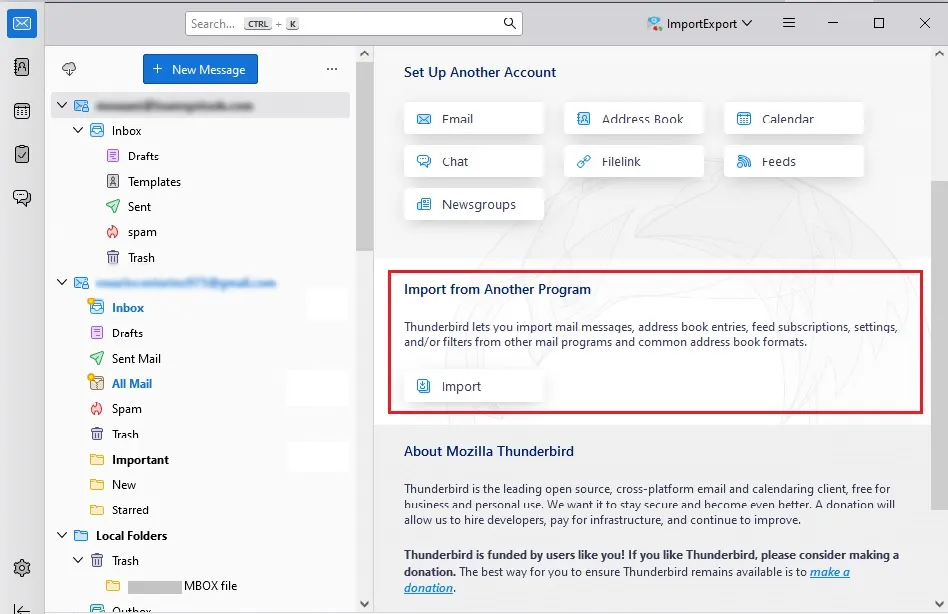
- After that, you can easily access all emails from the MBOX file.
- Right-click on the MBOX folder and choose ImportExportTools NG → Export All Messages in Folder → HTML format.
- This will convert MBOX to HTML file. Go to the location where the file is saved.
- Now, right-click on the saved .html file and open it with Microsoft Word.
- Then click Save As and save the file in DOC format at your preferred location.
- Repeat the above steps to save other exported emails into DOC format.
Here is the manual solution for MBOX to DOC conversion. However, there are a few limitations you can face, such as;
- You have to open or copy each email, which takes up a lot of users’ time.
- MBOX email structure may break. When users try to convert MBOX emails with images/attachments, they might not display correctly.
- With the free method, large MBOX files with thousands of emails are impractical to process manually.
- Manual copy-paste does not preserve email attachments; users can lose the attachment data.
- It’s possible to miss emails, or users can lose important content when they are trying to copy.
Batch Convert MBOX to DOC File with Attachments
If you want to convert MBOX emails into doc files in bulk, then try out the BLR MBOX Converter tool. MBOX to PST software, when converting emails, will preserve the key elements and attributes of the email. Most importantly, you can directly convert your MBOX emails into .doc file in a few simple clicks.

Download the demo version of the tool and learn how it works.
Conclusion
In this blog, we have discussed a quick method to convert MBOX to DOC format. The single tool is easy to use and can convert any type of MBOX file into a document file, migrate MBOX to Yandex, and other IMAP clients without hassle.
Some users prefer the manual method, but it can take a lot of time, especially when converting large MBOX files. Both methods can be used to export MBOX emails to DOC format, but the choice is yours.