Read time: 3 Min
MBOX file can save your entire mailbox data in a single file separated by the header file. However, it is difficult to open MBOX file without using any supportive email clients. Thus, many users prefer to save their mBOX file data into a portable and easy-to-open file. So they search for a solution to convert MBOX to PDF format.
Here in this blog, we will discuss the manual as well as the automated approach to complete the MBOX to PDF conversion. Before that, let’s find out the reasons for converting MBOX emails and other data into PDF format.
Why Convert MBOX to PDF File?
Converting MBOX emails into PDF file comes with various benefits. Some common reasons include;
- PDF files are easy to share through email or mobile apps.
- Unlike MBOX, PDFs can be opened offline without an email client.
- PDFs keep the original email layout, formatting, and attachments intact.
- The format is widely accepted for legal use and submitting emails as evidence.
- PDFs can be opened directly in web browsers without installing extra software.
- MBOX emails can be converted into password-protected PDFs for better security.
- PDF files are compact, easy to print, attach, and archive for personal or business use.
Here we discuss the reasons for the MBOX to PDF conversion process. Without any further delay, let’s move ahead and talk about the conversion process.
How to Convert MBOX Emails to PDF Manually?
Here in this section, we will discuss a few solutions to export MBOX to PDF file. However, before following the manual conversion instructions, keep in mind that these methods are not reliable.
1. Convert MBOX to Adobe PDF Using Thunderbird
First you need to install the Thunderbird client on your system. After that, using the ImportExportTool NG import MBOX to Thunderbird, then export it into PDF. Here are the steps.
- Install Mozilla Thunderbird on your system. If already installed, then launch it on your computer.
- From the menu bar, go to Add-ons and Themes → Extensions.
- In the search bar, type ImportExportTools NG and install the extension.
- Restart Thunderbird after the installation is complete.
- Right-click on Local Folders in Thunderbird.
- Select ImportExportTools NG → Import MBOX file.
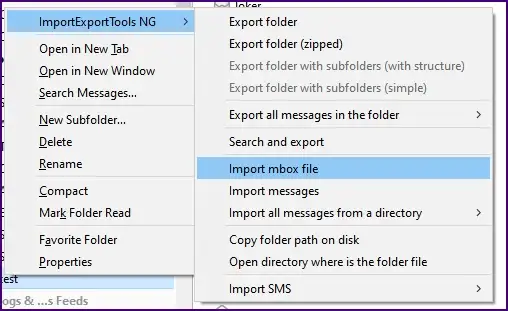
- Choose Import directly one or more MBOX files and click OK.
- Browse and select the MBOX file(s) you want to import.
- After importing, select the desired folder or specific emails.
- Right-click again, choose ImportExportTools NG → Export All Messages to folder → PDF Format.

- Choose the destination location to save the generated PDF files.
If you are using the new version of Thunderbird, then there is an in-built “Import ” option to load the MBOX file. However,
2. MBOX to PDF Conversion Using Apple Mail
Although this manual approach will convert your emails, this method is suitable for Apple Mail users who want to save MBOX emails in PDF format. Here are the steps;
- Open Apple Mail on your system.
- Click on File and select Import Mailboxes.

- Choose Files in MBOX format and click Continue.
- Select the file you want to import and click Continue to import MBOX to Apple Mail account.
- After importing, open the mailbox and select the emails you want to convert.
- Go to File and click on Print.
- Then choose save the PDF file.

- At last, browse the target location and hit the Save button.
Done! Here, complete the conversion process. However, with this manual approach, there are a few limitations, which include;
- Bulk conversion takes time to convert MBOX emails to PDF.
- Technical knowledge would be needed to export MBOX mail into PDF.
- Multiple email client installations are necessary.
- High changes of data loss when converting multiple MBOX files.
- No guarantee of data protection during conversion.
Automated Solution to Convert MBOX to PDF in Bulk
Use the direct method to convert MBOX emails into PDF format with attachments. BLR MBOX Converter offers a fast and simple way for MBOX files to PDF conversion with complete data accuracy.
MBOX to PST converter tool supports conversion with or without attachments and ensures no data loss during the process. Converting MBOX to PDF eliminates the need for multiple email clients or extensions. Additionally, using this tool, you can also convert MBOX to HTML, EML, TXT, CSV, and many more formats.

Users can also try the free trial version, which allows exporting up to 15 MBOX emails to PDF before purchasing.
Conclusion
This article discusses the reason you might want to convert MBOX files to PDF files and how to do it both manually and directly. The manual method is free, but most of the time the user faces issues with it. You can easily convert MBOX emails to PDF with or without attachments using the professional BLR Tools MBOX Converter and its advanced filters.