Read time: 3 Min
OLM is a data file created by Outlook for Mac; it stores emails, attachments, contacts, calendars, notes, etc., and other user information. It is similar to a PST file, which is a proprietary format of Outlook for Windows. While the PST file is accessible on both platforms, the OLM file is limited to Mac systems only. Users often face challenges accessing the OLM file on different platforms.
In this article, we will share simple and effective methods to access OLM files on different platforms. After going through the article, the users will learn how to open OLM file on Mac and Windows systems.
How to open an OLM file on Mac?
Outlook for Mac provides Import option to open an OLM file. Here are the complete steps to access the OLM file in Mac systems.
- Open Outlook for Mac.
- Now click on Tools, and select Import.
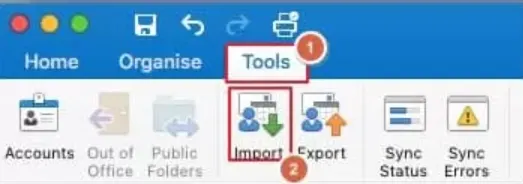
- Select the Outlook for Mac archive file (.olm) from the available options.
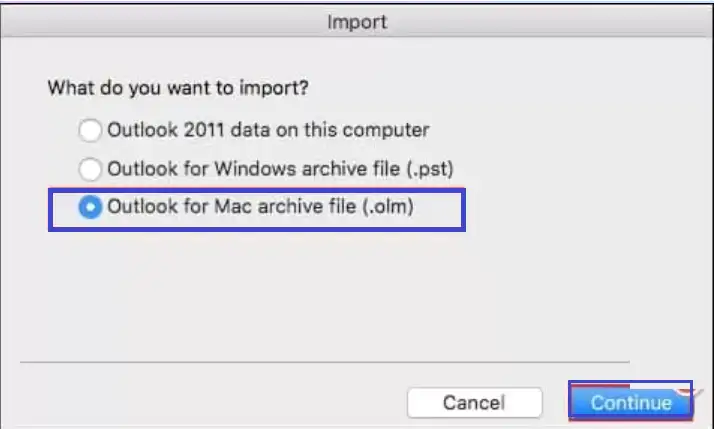
- Navigate to the location where the OLM file is saved and select the file.
- Click the Import button to import your OLM file.
Steps to Open OLM Files on Windows
Since OLM files are accessible only with Outlook for Mac, there is no direct method to open an OLM file on Windows. However, with some workarounds, you can import OLM files to Outlook for Windows. You can transfer OLM file data to a Gmail account by configuring the Gmail ID in Outlook for Mac and then configuring the same Gmail ID in Microsoft Outlook. Here are the complete steps to access OLM file data in Windows.
- Open the Outlook application for Mac.
- Go to Tools > Accounts.
- Click Add Account,
- Enter your Gmail account credentials and follow the steps on screen.
After configuring your Gmail account in Outlook for Mac, create a new folder under your Gmail account and drag and drop emails and folders from your already configured email. Now you have all your OLM emails moved to your Gmail account. Now you can configure the same Gmail ID in Outlook for Windows and access OLM file data.
How to Open OLM files without Outlook
To open OLM file without Outlook, you can take the help of some professional OLM Converter solutions. BLR OLM Converter is one such application that can help users to open OLM files, view emails, and save them to different formats. It allows users to convert OLM to PST, HTML, PDF, TXT, MBOX, and various other formats. Users can also directly import OLM to Office 365, iCloud, Gmail, Yahoo Mail, etc., with the help of this tool. It provides a safe conversion of emails without altering the original properties and formatting of emails.

Conclusion
We can open an OLM file on Mac directly by importing the OLM file with the built-in import option provided in the application. But for Windows, there is no direct method to open an OLM file. So to access OLM file data in Outlook for Windows, we need to use some tricks which we have described in the blog above. If you don’t have Outlook installed, you can take the help of advanced software like BLR OLM Converter and view OLM file data and save it to different formats according to your requirements.