Read time: 3 Min
Looking to import MBOX to Roundcube Webmail but not sure where to start? Many users face issues when trying to migrate emails from a desktop to a cloud server. Here in this post, we discuss one such scenario where we discuss the easy and secure way to import MBOX to Roundcube webmail.
Since Roundcube is a webmail client, it gives an option to import MBOX file. However, you can only import an MBOX file of 50 MB in size. This direct way is not suitable for large-sized or multiple MBOX file imports. Let’s discuss the different ways to import MBOX emails to Roundcube webmail account.
Situation to Import MBOX File to Roundcube Webmail
There are various reasons for importing MBOX emails to Roundcube mailbox, most common include;
- Roundcube works in a web browser, so it is easy to access emails anytime and anywhere.
- It supports IMAP, so you can connect to different email services easily.
- You can manage multiple MBOX file data in one place.
- MBOX files need software like Mozilla Thunderbird or Apple Mail to open them, but Roundcube opens directly in a browser.
Manual Way to Import MBOX to Roundcube Mail
There is a built-in option to import .mbox file into Roundcube, but the size of the MBOX file must be limited to 50 MB. Here are the steps;
- Log in to Roundcube Webmail.
- Click the folder where you want to import the emails (or create a new one).
- Click the Gear Icon (folder actions) in the footer of the folder list, or the three vertical dots.
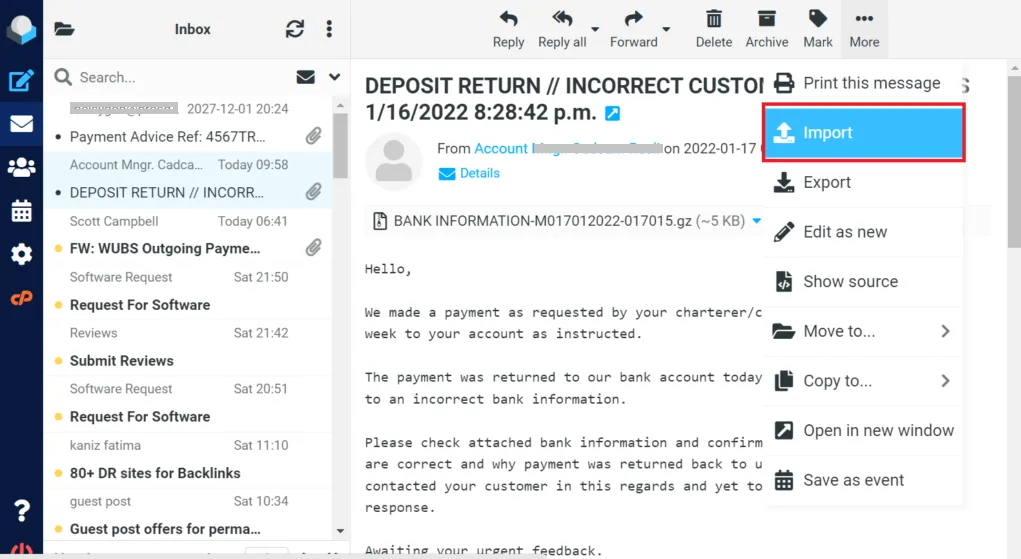
- Select Import messages.
- Click Browse to locate and select your MBOX file from your computer.
- Click Upload to begin the process.
Done! Here are the manual ways to migrate MBOX emails to Roundcube mailbox. However, there are some limitations with this.
- It will import limited size file; if the size is large, then the import process will not proceed.
- You can’t import multiple MBOX files at once.
- No option for selective import (date, folder, etc.)
- Cannot automatically remove duplicate emails.
Batch Migrate MBOX Emails to Roundcube Webmail
With the BLR MBOX Converter tool, it is easy to import multiple MBOX files to Roundcube webmail at once without any data loss. With this tool, you can choose the email folder and import the selective data. Moreover, this tool gives an option to delete duplicate emails while importing the emails. Download the demo version of the software and analyse how it works. This tool can convert MBOX to CSV, HTML, PDF, PST, EML and other formats easliy.

Conclusion
To import MBOX to Roundcube, remember that Roundcube does not support direct MBOX upload. You must use Mozilla Thunderbird or another tool to upload emails through IMAP.
The manual method works but can be slow for large files. For a faster and easier process, a professional tool is a better option.