Read time: 3 Min
OST file (Offline Storage Table) is an Outlook data file used to store emails and other email data locally on the user’s system. Sometimes a user wants to migrate away from Outlook to Zimbra Mail. It is one of the secure email clients preferred by businesses and individuals for its security and better email management. To access emails stored in an OST file user need to convert the OST file to a format that is accessible with Zimbra Mail. However, when users try to transfer OST to Zimbra, they get stuck, as there is no direct manual way. The OST file needs to be converted to PST format first, then imported to Zimbra Mail. Follow the blog to know the step-by-step guide.
Why Need to Import OST to Zimbra Mail?
It is important to move emails from OST file into Zimbra Mail account. The major ones are –
- The OST file is connected to a particular Outlook profile, and you can access it on the same system only. You can’t just copy the file and open it in a different platform, Zimbra. The file needs to be converted into a format that can be supported by the email client.
- If you are planning to discontinue Outlook and want to secure your data. In that case, it is better to transfer it to your email account. Thus, transferring OST to Zimbra helps you to access your older emails, contacts, calendars, and other data.
- An OST file is prone to corruption issues; you can lose access to OST emails if your system crashes or your Outlook profile is deleted. To avoid all these situations, you can import OST to Zimbra Mail account. In that way, you will not lose your data.
- With time, the OST gets too large and requires a lot of space on the hard disk, moving emails to a web client is always a better option.
How to Transfer OST to Zimbra Mail Account?
In this post, we will discuss the manual solutions to move OST emails into Zimbra mailbox and a professional tool to transfer OST to Zimbra Mail instantly. If you are still using an Outlook profile that creates OST, then you can use the manual method. In case of orphan OST, you will need an OST to Zimbra migration tool.
- Manually Using Outlook
- Using BLR OST to PST Converter
Let’s discuss these two solutions in detail with a step-by-step guide.
Method 1: Manually Transfer OST Emails to Zimbra Account
If you have access to the original Outlook profile, then follow the steps. Otherwise, skip it and try the professional tool.
- Open Outlook and click on File.
- After that, click Open & Export > Import/Export.
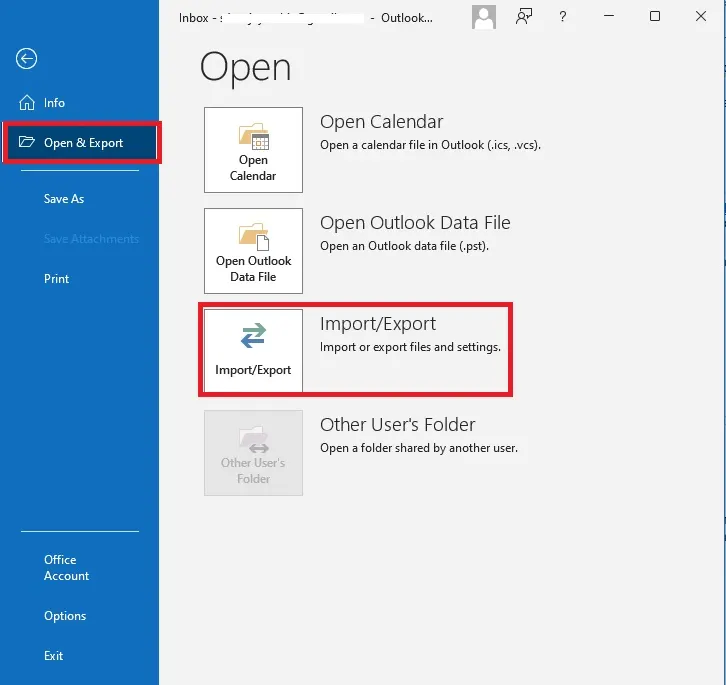
- Export to a File > PST File.
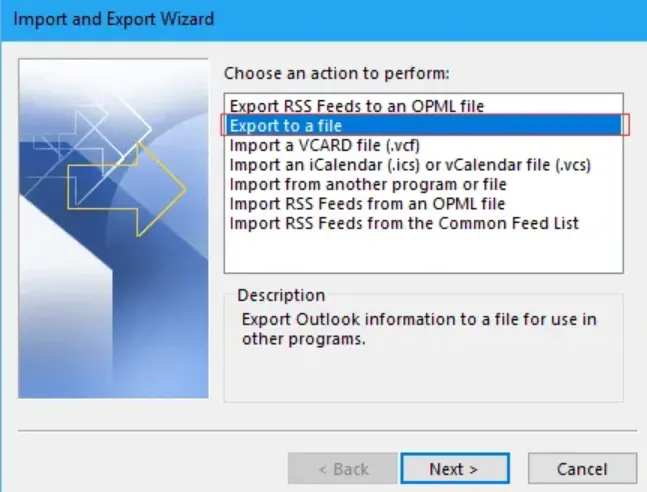
- Choose the folders you want to export.
- Browse the saving location and after that, click on Finish to convert OST emails to PST format.
- Now add your Zimbra Mail account to Outlook. For that, File > Add Account.
- Enter your Zimbra Mail login details and hit the connect button. Outlook will automatically connect with your webmail. If not, then enter details manually.
- After configuration is completed, go to File > Open&Export > Import/Export.
- Choose Import from another program and file > PST file.
- Browse the file that we just exported in the above steps.
- In the Import item in the same folder drop-down list, choose your Zimbra Mail account.
- After that, click on the Finish button to start the process. Now, log in to your mail account and locate the imported emails.
Done! Here is the manual method for OST to Zimbra mail import. Users can also import OST to Outlook by converting OST to PST and then importing the newly created PST file to Outlook.
Method 2: Import OST to Zimbra Webmail Automatically
With the BLR OST to PST Converter Tool, you can directly move OST emails into a Zimbra Mail account in a few clicks. With its simple and user-friendly interface, it is easy to complete the transfer process without any effort. While importing emails, OST to PST Converter tool maintains folder and sub-folder structure and hierarchy. Moreover, you can also transfer orphan and corrupted OST files into Zimbra Mail account with ease.

Conclusion
Here we conclude that with the right approach, it is easy to transfer OST emails to Zimbra Mail account. You can either use the manual approach or the automated tool. Try out both the solutions and find out which one suits you best. Hope that at the end you will effortlessly import your emails without any hassle.