Read time: 3 Min
OST or Offline Storage Table is an Outlook data file used to store user mailbox data like emails, contacts, attachments, notes, calendars, etc., offline. Yandex is a free cloud-based email service used in Russia. Yandex provides free unlimited storage, has a good interface, and a better spam filter. If you want to transfer OST emails to Yandex Mail then there is no direct option, but with some tricks user can move OST emails to Yandex Mail. If you want to transfer OST emails to Yandex Mail, then there is no direct solution. In this post, we’ll explore the reasons for transferring OST emails to Yandex Mail and walk you through the step-by-step process. So, without further delay, let’s get started.
Why Users Want to Transfer OST to Yandex Mail?
When users switch to another platform, they want to move their old data as well. When a user moves from Outlook to Thunderbird or Apple Mail he need to convert OST to MBOX. Similarly, when a user moves to Yandex, the OST file needs to be imported to Yandex Mail. There are various situations when a user wants to move emails from an Outlook OST file into a Yandex mailbox. Some of the common ones are:
- You have an orphaned OST file from a deleted account and can’t access your emails.
- If you have multiple OST files, then migrate all the data files to one place.
- Yandex Mail offers generous free storage and can be accessed from any device.
How to Transfer OST Emails to Yandex Mail?
Here in this section, we will discuss the two workable solutions to import OST to Yandex Mail. One is a manual solution, and the other is the direct approach. The manual method is quite lengthy and requires Outlook access. However, if the OST file you are trying to transfer is orphaned, then the manual method will not work. In that case, you can use the expert tool. Let’s check out the detailed process.
Approach 1: Manually Migrate OST File to Yandex Mail
Here, you need to access your Outlook profile and OST file from the same one. If both condition is fulfilled, then follow the given instructions –
- Open Outlook and go to File > Add Account.
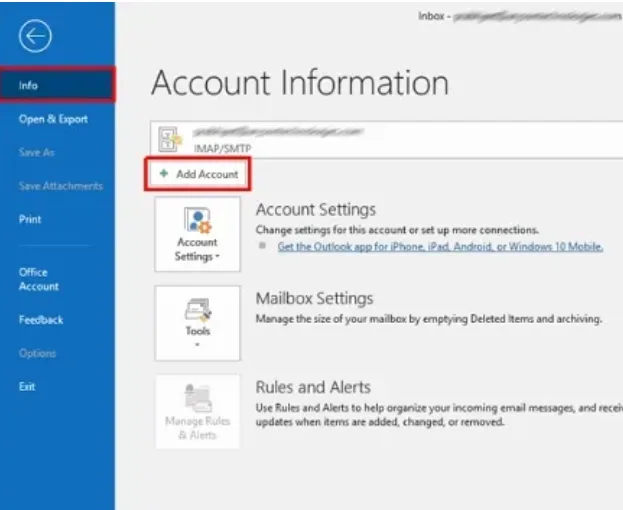
- Enter your Yandex email address and select IMAP configuration.
- Use the following server settings:
- Incoming Mail (IMAP): imap.yandex.com, Port: 993 (SSL)
- Outgoing Mail (SMTP): smtp.yandex.com, Port: 465 (SSL)
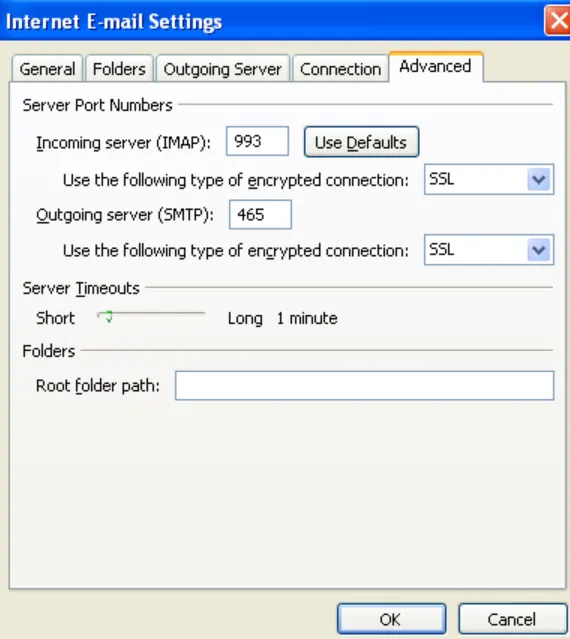
- Enter your Yandex password (or an app password if you use 2FA) and complete the setup.
- Once Yandex Mail appears in Outlook, open the OST mailbox.
- Select the folders or emails you want to migrate and drag them into the corresponding Yandex folders.
- Wait for Outlook to sync the data with Yandex servers.
Done! Here completes the OST to Yandex Mail migration. However, before you use this method, make sure you have complete technical knowledge of configuration settings.
Approach 2: Transfer OST Emails to Yandex Mail Automatically
For direct and hassle-free migration, try out the BLR OST to PST Converter tool on your Windows. OST to PST converter software effortlessly transfers corrupted, damaged, and orphaned OST file without any data loss. Moreover, while importing emails, the tool maintains the email folder and sub-folder hierarchy and structure. It is mostly suitable for non-technical users who are not familiar with the technicalities.

Features of BLR OST to PST Converter
The prominent features of the BLR OST to PST Converter are as follows:
- Export OST emails to Yandex Mail.
- Export OST to Office 365, Gmail, and various other webmail accounts.
- Save OST emails to PDF, HTML, EML, or MSG formats.
- Convert a damaged or orphaned OST file to a healthy file.
- Provides the option to save only selected items from the OST file.
- The original folder structure remains intact after conversion.
Conclusion
Importing OST emails to Yandex Mail is not a difficult process with the right approach. If you have access to your Outlook, then you can opt for the manual solution. In the case of an orphaned or damaged OST file, the software is the best method. Now you can decide which of the mentioned solutions is best suited to you.