Read time: 3 Min
The OST file stores a local copy of Outlook mailbox data, helping users access their emails when a connection to the Exchange Server is not available. The OST file can be accessed only with the original Outlook profile in the Exchange environment.
IMAP is a protocol that enables users to access emails from a remote server. It allows users to access emails from multiple devices without saving them as a local copy, which saves hard disk space.
However, if you are migrating to IMAP server and need to access emails from the OST file, then you need to import OST emails to IMAP server. When we are talking about how to migrate OST emails to IMAP Server, then there is no direct option. However, there are a few workarounds that help in importing emails from OST file. Before that, let us find various reasons that leads user to migrate to IMAP servers.
Why Transfer OST File to IMAP Server Account?
Some of the benefits of importing the OST file to the IMAP Server account are:
- OST files are tied to the Outlook profile and accessible only with that profile. When the Outlook profile is corrupt OST files become inaccessible; therefore user prefer IMAP servers.
- Email data is stored on Server thus the data is synced to all devices instantly with zero probability of synchronization conflicts.
- When the OST file gets corrupt, it is quite difficult to repair OST file without using professional repair tools.
- Emails stored on an IMAP server can be accessed by multiple users simultaneously, which makes it easier to collaborate and work efficiently.
- Email migration is quick and simple in the case of an IMAP server.
How to Migrate OST Emails to IMAP Server Manually?
You can upload OST file data to an IMAP server using Outlook, but only if the OST file is linked to an active Outlook profile. If it is, follow these steps:
Method 1. Export OST to PST
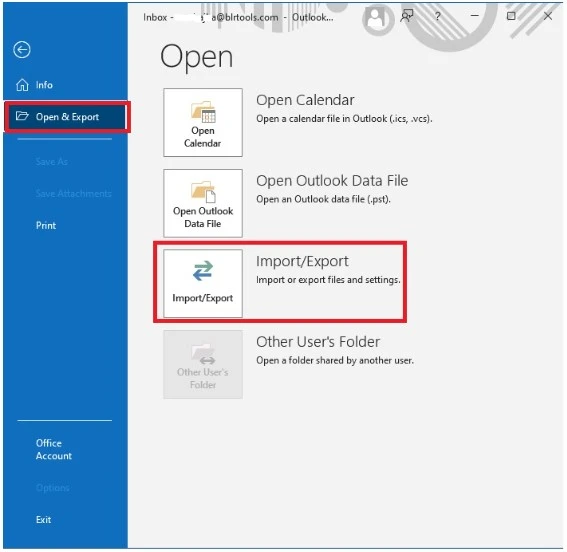
- Open Outlook > File > Open & Export > Import/Export.
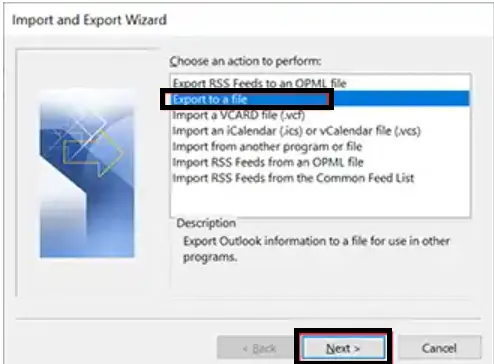
- Choose Export to a file > Outlook Data File (.pst).
- Select the OST mailbox folders and export them as PST.
- Browse to the location to save the exported data file and click on Finish.
Here you Convert OST to PST file. Now follow the steps to complete the import.
Method 2. Configure IMAP Account in Outlook
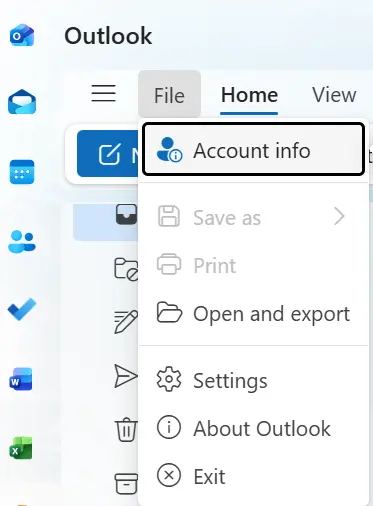
- Go to File > Account Info.
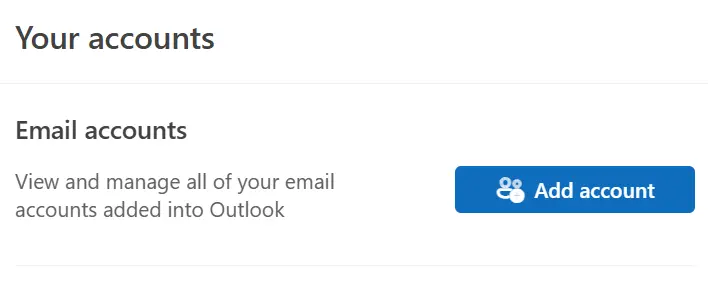
- Click Add Account.
- Enter IMAP server details.
- Verify successful account setup.
Method 3. Import PST into IMAP
- Open the exported PST in Outlook (File > Open & Export > Open Outlook Data File).
- Drag and drop folders/emails from the PST into the IMAP mailbox.
- Allow Outlook to sync with the IMAP server.
Here, you complete the process and move Outlook emails to Gmail or other IMAP servers that you connected to above.
Limitations of Manual Solution
Although this solution will transfer OST emails to an IMAP server, there are a few setbacks:
- You will need an Outlook installation and an active Outlook profile.
- If the OST file you are trying to import is an orphan, then you can’t view OST file emails, and this manual solution doesn’t work.
- The OST file you are trying to import is damaged; the manual method would not work.
- It can also cause a synchronization issue and lead to data loss.
- If the OST file is too large, then it will be a lengthy and time-consuming process.
How to Import OST Emails to IMAP Server Instantly?
With the BLR OST to PST Converter Tool, one can effortlessly transfer emails from an OST file into an IMAP Server mailbox with ease. Using this tool, you can import an OST file from Outlook 2021/2019/2016 and all other older versions. Moreover, it also migrates corrupted or damaged OST files into IMAP Server mailboxes instantly without any data loss.

Download the demo version of the software to learn more about it.
Conclusion
This post guides you to import OST emails to an IMAP Server in two ways. One is a manual solution that requires Outlook installation, and the other is an automated tool. Where the manual method required technical knowledge and a lengthy process, BLR OST Email Converter will complete the task in a few clicks.