Read time: 3 Min
Mozilla Thunderbird and Apple Mail are both popular email clients used by a large number of users worldwide. Thunderbird is an open-source email client that can be used on Windows, Linux, or MAC systems. Apple Mail is a primary email client for Apple devices. Sometimes users prefer to migrate away from Thunderbird to the Apple Mail client; in such a scenario user search for solutions to migrate Thunderbird to Apple Mail. We are going to share an easy step-by-step tutorial to move Thunderbird to Apple Mail.
Why Convert from Thunderbird to Apple Mail?
There are some valid reasons mentioned that make the migration process necessary for users.
- Apple Mail is a default email client in MAC system, it comes pre-installed and have clean user interface.
- Users can access their emails across different devices without any hassle.
- Apple Mail is optimized for macOS. Users get smooth performance with a fast loading time.
- Apple Mail can easily integrate other Apple services like iCloud, Calendar, Contacts, Notes, etc.
- Users get multiple benefits from macOS, such as regular security updates, privacy features, and many more.
Migrate Thunderbird to Apple Mail using ImportExportTools
Both Apple Mail and Thunderbird store emails in MBOX format, but you can’t import Thunderbird emails to Apple Mail directly. You have to follow the two-step process mentioned below:
Step 1: Export MBOX File From Thunderbird
- Open Thunderbird.
- Now, click on Tools and select Add-ons and Themes.
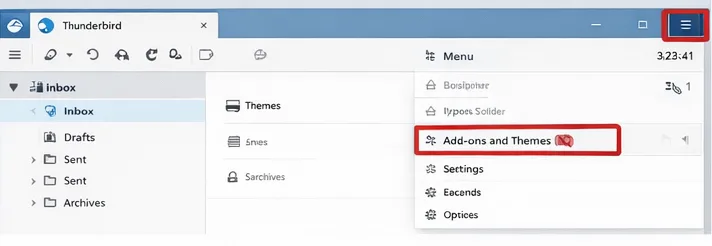
- Search for ImportExportTools NG and click on Add to Thunderbird.

- Now, select the folder to export.
- Select the destination to export the files.
- After that, rename the exported file to the .mbox extension.
- Now, MAC will send a confirmation pop-up; click Yes to import Thunderbird to Mac Mail.
Step 2: Import MBOX to Apple Mail
- Open Apple Mail.
- Now, click on File and select Import Mailboxes.
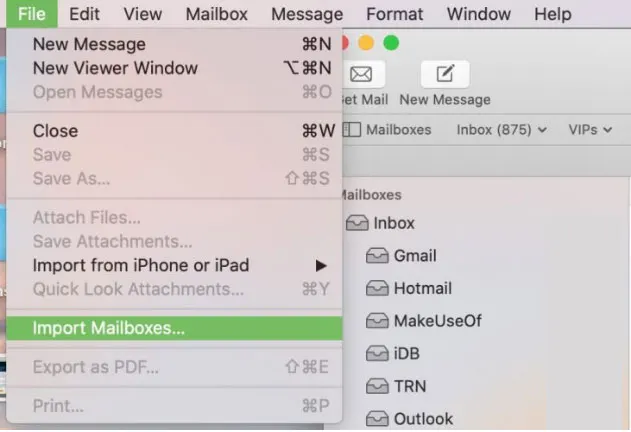
- Choose the “Files in MBOX Format” and hit Continue.
- Browse the MBOX file created by the previous step.
Convert Thunderbird to Mac Mail Automated Solution
If users want a direct solution to migrate Thunderbird to Apple Mail, then try the BLR MBOX Converter Tool. This application helps users convert Thunderbird (MBOX, MBS, MBX, MSF, and SBD) formats easily. There is no data size limitation using a professional solution like MBOX Converter. MBOX to PST Converter tool also preserves the email properties that make the conversion process simple for technical and non-technical users. This tool can be used on all Windows OS editions, whether it’s a new or an old version.

Salient Features of MBOX Converter
- This application also converts Thunderbird to Gmail, PDF, PST, and other formats.
- Support all MS Outlook editions and other MBOX-supportive email clients such as Eudora, SeaMonkey, Entourage, etc.
- There are no limitations to convert Thunderbird files into Apple Mail.
- The user can also import Thunderbird files into Office 365.
- Software works on all Windows versions.
- Some of you can get an overview of the tool with a free trial edition.
Conclusion
This blog gives you a complete overview of converting emails from Thunderbird to an Apple Mail account. The manual method has a lot of challenges in migrating Mozilla Thunderbird files, such as time consumption and data integrity. With the expert solution, users can directly import emails from Thunderbird in bulk. If users have a small number of emails, then the manual method is best, but this technique is not good for batch conversion. I hope this blog gives an easy method to export Thunderbird files to Apple Mail.