

Read time: 3 Min
The Outlook stores all Outlook items, including emails, contacts, calendars, notes, tasks, etc., in the Personal Storage Table(PST) file. There are situations when a user wants to extract contacts from PST file for backup, sharing, or better organization. It can be challenging to retrieve contacts if you don’t know the right method. Don’t worry, in this blog, we are going to guide you through various manual methods to extract contacts from Outlook PST file. We will also discuss a professional tool that can be handy in extracting contacts from PST file if the manual method fails.
Reasons to Extract Contacts from PST
Users may need to extract contacts from Outlook PST file for several reasons. :
- Transfer contacts from one email to another email.
- Make a copy of your contacts to keep them safe.
- Organize and access contacts outside of Outlook.
- Add contacts to spreadsheets, CRMs, and other business applications.
Manual Method to Extract Contacts from Outlook PST
Outlook allows users to extract Outlook contacts safely by following the steps given below:
- Open MS Outlook
- Click Open & Export
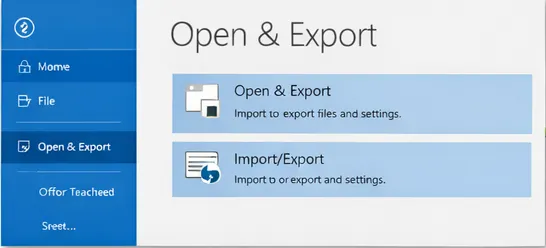
- Select Import/Export Wizard
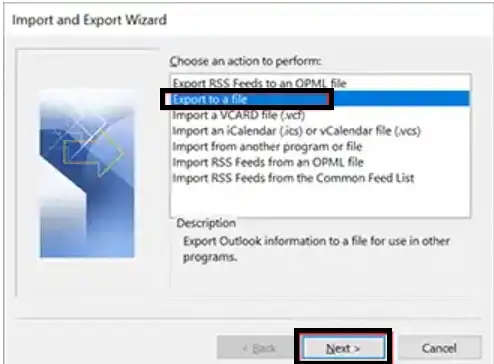
- Choose the Export to a File option > Next button.
- Select File Type – Choose the Comma Separated value and convert PST to CSV file.
- Select Contact Folder – Decide which Contacts folder you wish to export.
- Select Destination – Indicate the location of the exported file’s storage.
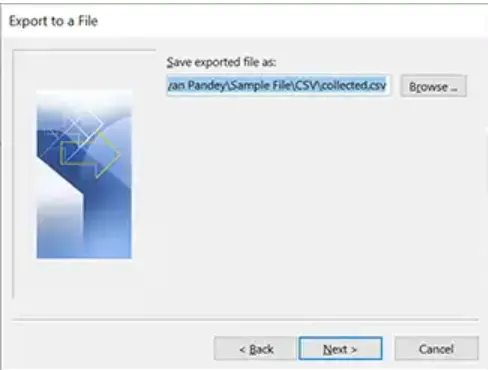
- Finish Export – To finish the export, click Finish.
Limitations of the Manual Method
- When the PST file is corrupted or damaged, you have to repair PST file first before starting to export contacts.
- The process is time-consuming if you have a huge PST file with a large number of contacts.
- No filters or format options available.
- If fields in the exported file do not map correctly, manual adjustments might be required.
- Sometimes the Outlook Import/Export option is greyed out, preventing manual extraction.
The traditional approach may not be feasible for large or damaged files, but it works well for small PST files and simple requirements.
Method to Extract Contacts from PST Without Outlook
The manual method of extracting contacts from Outlook PST is suitable for a small number of contacts. If you have a large number of contacts to extract, you must take the help of the professional BLR PST Converter Tool for safe and reliable extraction of contacts. You can quickly extract Outlook PST contacts, save PST contacts, and maintain your data organized for either personal or professional purposes if you use the correct technique.

Conclusion
In the above guide, we have discussed two different approaches to extract contacts from PST file. The first one is a manual method that helps users to extract contacts from Outlook PTS file without any hassle if performed with care. In the second method, we suggested a professional software that allows users to extract contacts safely and securely without any errors. We have also discussed various limitations of manual methods and how a user can overcome them by using a professional tool.