Read time: 3 Min
Mozilla Thunderbird is an open-source email client that is free to use. Millions of users worldwide prefer Thunderbird for managing email, contacts, calendars, etc. However, when users want to share emails, saving them to a format that is globally accessible is the right method. PDF is one such portable format that can be accessed globally, irrespective of the device or operating system used. This article will dive into different methods to convert Thunderbird emails to PDF format.
Why Convert Thunderbird Emails to PDF?
One popular standard format to transfer documents is the Portable Document Format, or PDF. It gives you multiple benefits, such as archiving emails, opening MBOX files without an email client, securely transferring, and many more. PDF files work with all operating systems. It can be opened on virtually any device and operating system without the need for special software. This file is also highly secure and users can be password-protected to prevent unauthorized access. Furthermore, PDFs are easy to share and forward with colleagues, legal teams, or anyone else who needs to view them.
Common cases when converting Thunderbird emails to PDF
- PDF is a globally supported format; users can access a PDF file on Windows, MAC, Android, or Linux systems without any hassles.
- The PDF file can be password-protected to save data from unauthorized access.
- PDF is an accepted format for legal uses by forensics that makes the need to save Thunderbird email to PDF important.
- For archiving emails for future use, Thunderbird emails can be saved to PDF format.
Method 1: Try Print Function in Thunderbird (Single File)
This technique mostly uses the Windows OS built-in function “Print to PDF.”
- Start Mozilla Thunderbird.
- Choose emails and click the “more” button.
- Use the Ctrl+P key or open the Print dialog.
- Go to the print dialog and search for any “destination” or “printer dropdown.”
- Use “Save as PDF” or utilize the “Microsoft Print to PDF.”
- Now, click on the save button and choose the location or filename of the PDF.
Method 2: Shift Thunderbird Mailbox to PDF by ImportExportTools NG Add-on
This method allows users to convert bulk Thunderbird emails to PDF format. In this method, users cannot convert attachment within emails. They need to proceed with this method without attachments.
- Open Thunderbird again.
- Click on “Go to Tools > Add-ons.“
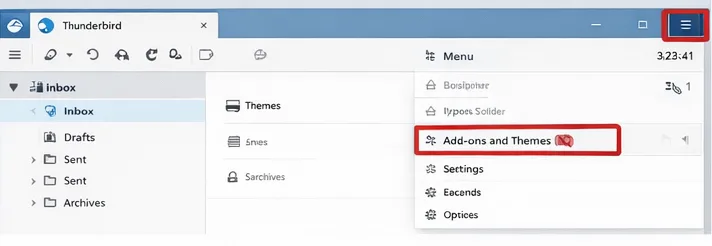
- Search for or install the “ImportExportTools NG” add-on in Thunderbird.
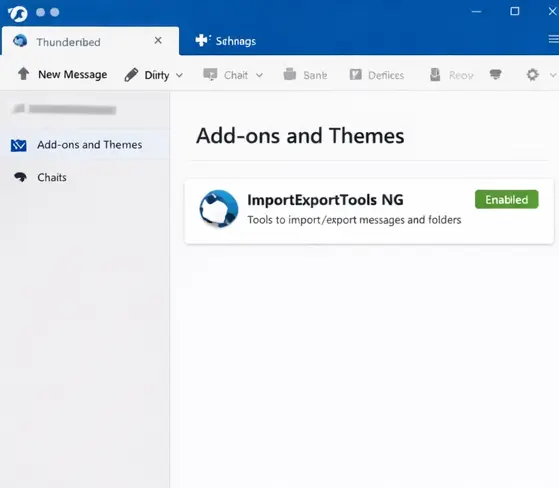
- Restart Thunderbird once the add-on is installed.
- Right-click and select the folder in Thunderbird.
- Choose “ImportExportTools NG.”
- Use this option: “Export all messages in the folder.“
- After this, select the “PDF” format.
- Click “OK” to export emails.
Challenges Faced in Manual Thunderbird to PDF Conversion
The need to convert Thunderbird emails to PDF is clear in the above-mentioned reasons. There can be several challenges in the conversion process. When you are dealing with a large volume of Thunderbird emails. Thunderbirds also comes with a limited built-in export feature. While you can print a single email to PDF, there is no native function to convert a full Thunderbird mailbox to PDF format in one go. The Manual method is not only time-consuming but also highly inefficient for exporting Thunderbird files into PDF format.
Using the free method raises the chance of data loss or formatting problems within emails. When users use the cost-free solution to convert Thunderbird emails, then the important email details, such as headers, attachments, original email structure, etc., can be lost or distorted. The manual method highlights the need for a direct and reliable solution. Bulk conversion can be controlled by an experienced tool without sacrificing data integrity.
Pro Solution to Convert Thunderbird to PDF
If users are looking for a professional and efficient solution to convert Thunderbird emails to PDF in bulk, then try the BLR MBOX Converter tool. This application makes the process simple for technical and non-technical users. MBOX to PST Converter tool can handle bulk Thunderbird emails or folders at one time without any data size limitation. Some users didn’t face any hassle when they were trying to export emails from Thunderbird to PDF format. No multiple techniques or email client installation are needed to print Thunderbird emails into a PDF document. This tool can simply convert MBOX files to PDF that users get from Thunderbird.

Attractive & Top-Notch Features in Pro Solution
- Batch Conversion: With the software, users can convert Thunderbird emails into PDF format in bulk.
- Maintains Folder Hierarchy: The folder structure is maintained by this advanced tool. The application preserves the original formatting and properties of emails when users convert specific emails and attachments.
- Preserves Attachments: Attachments are either embedded within the PDF. This tool can also include or exclude attachments before beginning conversion.
- Saves Time: When anyone converts Thunderbird emails in bulk, it also reduces the time and effort that is wasted in the free method.
- 100% Data Integrity: Another feature of this application is that it preserves all email attributes, including headers, formatting, metadata, etc., as the original email.
- Easy & User-Friendly: The user interface is so intuitive that it can be used by any novice user if they want to export Thunderbird email to PDF format.
Final Thoughts
In this guide, we discussed manual methods to convert Thunderbird emails to PDF for free. The manual methods have a few limitations, thus opting for third-party tool for saving Thunderbird emails to PDF is a better option. If users have a large number of emails for conversion, they can use an expert solution, and if they have a smaller number of emails, manual methods work for them.