Read time: 3 Min
If you use Outlook, you are aware of the importance of correctly handling your email data. All contacts, calendar entries, and emails are saved in PST files by Microsoft Outlook. Even though PST files are great for backing up big data sets, there are times when you need individual emails in MSG format. That’s where the need to convert PST to MSG files arises.
This guide provides the best techniques and resources to ensure a smooth PST to MSG conversion.
Reasons to Convert PST to MSG Files
Users prefer to export PST to MSG for several reasons:
- Individual Email Access: MSG files also provide an opportunity to access individual emails without having to open the whole PST.
- Simple Sharing: Without sharing the entire PST file, you can share MSG files with clients or others at work.
- Improved Archiving: MSG files make it possible to archive emails in an orderly manner, particularly for business or legal reasons.
- Selective Backup: Instead of taking a backup of the whole PST file, the user can choose to back up only important emails.
You can choose the most effective method for converting PST emails to MSG format by being aware of these advantages.
Easy Manual Method to Convert PST to MSG File
Outlook users can save emails to MSG format individually by following the steps mentioned:
- Open Microsoft Outlook
- From the File menu, click Open & Export
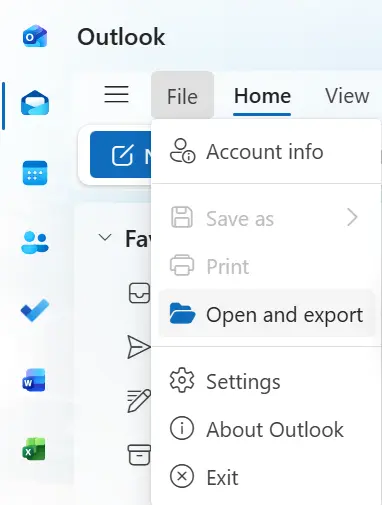
- Open the Outlook Data File and select your PST file.
- Select the folder where the emails you wish to convert are located.
- Right-click on the email you want to save as a MSG file.
- From the options, choose Save as MSG
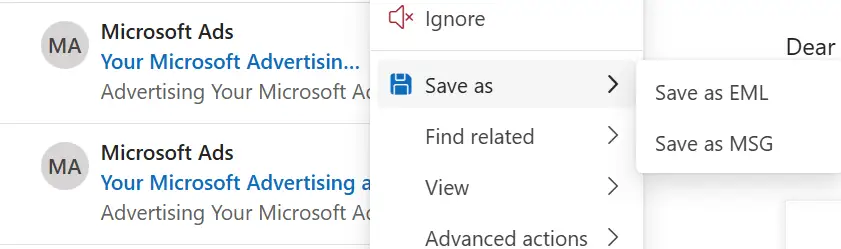
- Pick the destination folder and click Save.
Limitations:
- When dealing with a large PST file, this method becomes difficult, but it works well for a few emails.
- There is no support for bulk conversion, which can take a long time.
- If your PST file is corrupt or too big, repair Outlook PST file to fix it.
How to Convert PST to MSG Files in Bulk?
Though manually converting PST to MSG file is easy, it is time-consuming if you have a large number of emails to convert. With the help of advanced software like the BLR PST Converter tool, you can save your PST emails to a MSG file quickly and safely.

Benefits of Using a PST Email Converter:
- Convert any number of emails with a single click to save time.
- Preserve the original formatting and properties of the email for accurate documentation.
- Software can convert PST to HTML, MBOX, EML, and PDF with simple clicks.
- It ensures a safe conversion without data loss.
- An easy-to-use interface that allows users with limited knowledge to perform conversions easily.
- During the process of converting, avoid changing the email and folder structure.
Conclusion
In the above guide, we have stated both manual and automated methods to convert PST to MSG. Though the manual method for PST to MSG conversion is simple, sometimes users may face difficulties in performing the task due to PST file corruption or inaccessibility. Moreover manual method requires a lot of time if you have a large number of emails to convert. In this case, using a professional PST converter is suggested for efficiently converting PST to MSG files.