Read time: 3 Min
Email clients like Zimbra, Outlook Express, Zoho Mail, Windows Live Mail, & Mozilla Thunderbird have one thing in common. They all have emails and other information stored in EML file. However, EML files are individual files for each email, thus making it difficult to manage. Thus need of converting EML files to a simple and manageable format arises.
Most of the users prefer to convert EML files to PDF as they are best for sharing purposes and can be accessed anywhere, irrespective of the device used. It is always a wise decision to convert EML file to PDF for easy sharing, backup, and archiving purposes. As PDF files are easy to share and can be secured with passwords as well, for security reasons. In this article, we will explore both manual and automatic solutions to convert .eml files to pdf.
Why Convert EML file to PDF?
Before learning how to convert EML file to PDF, let us understand the common reasons why converting .eml file to PDF is required. Some of the common reasons include:
- PDF file can be easily shared and accessed on any device.
- For a legal document, PDF is a widely accepted file format.
- We can password-protect PDF file, preventing unauthorized access.
- PDF file keeps original layout, headers, text, images, and attachments intact.
- It is easier to take print of PDF file.
- PDF file are read-only, which ensures the email content cannot be altered.
- PDF files are best for archiving emails safely for long-term use.
Manual Methods to Convert EML File to PDF
There are a few manual methods to convert EML files to PDF. We will discuss all of them in detail below:
Method 1: Convert EML to PDF using Thunderbird
Mozilla Thunderbird is one of the commonly used email client, we can convert EML to PDF using Thunderbird by following the steps mentioned below:
- Open Thunderbird email client.
- Navigate to Menu > Add-ons and Themes.
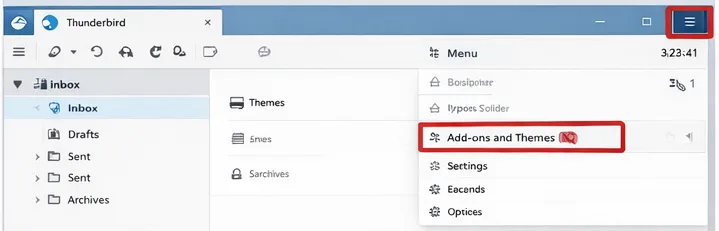
- Search for ImportExportTools NG addon and install it.
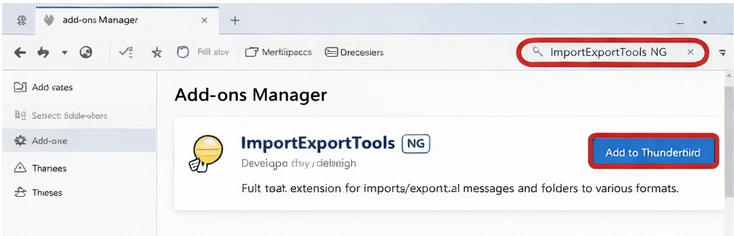
- Now restart the Thunderbird application.
- Import EML file to Thunderbird.
- Right-click on the folder that contains EML files.
- Now Select Import/ExportTools NG, select all messages in the folder.
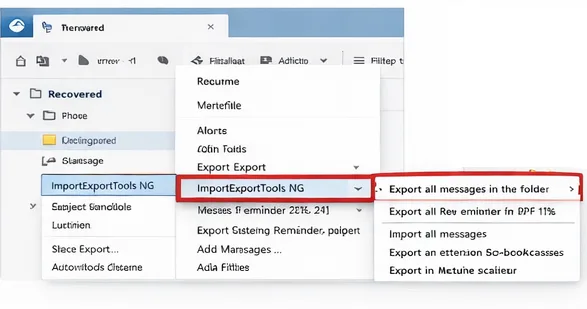
- Choose PDF format.
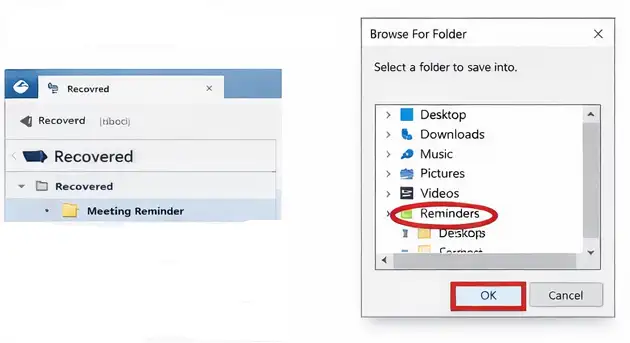
- Select the destination location.
Method 2: Convert EML to PDF using Outlook
You can save EML files to PDF format using Outlook, but as we know, EML files can’t be accessed directly in Outlook. We have to convert EML to PST file by dragging the EML file to any folder in MS Outlook. Here are the steps involved to perform the task:
- Open Outlook and drag EML file to the newly created folder in Outlook.
- Select the EML file.
- From the File menu, select Print.
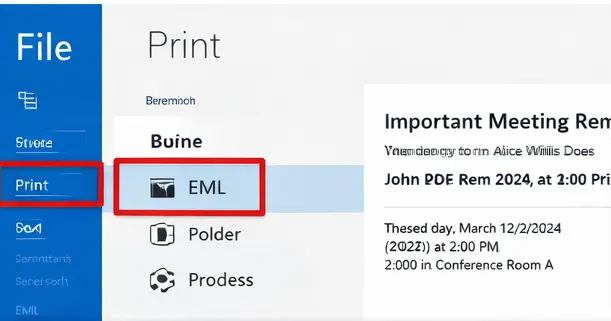
- Select the ‘Microsoft Print to PDF’ option in Printer.
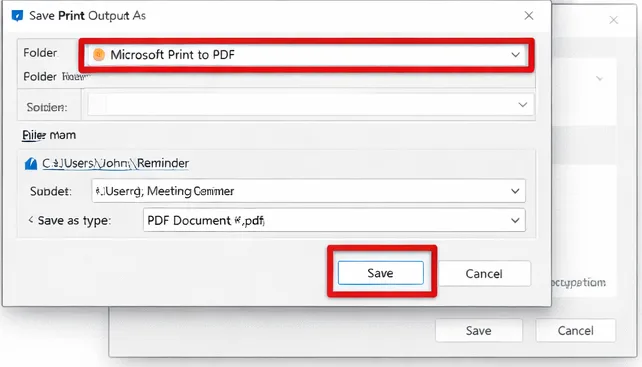
- Select the destination folder to save the PDF.
Drawbacks of Manual EML to PDF Conversion
There are some limitations to convert eml files to pst manually. Some of the limitations are listed here:
- Bulk conversion is not possible in the manual EML to PDF conversion method.
- Manual methods are not recommended as the folder hierarchy is not maintained.
- The risk of data loss is high during the conversion process.
- Manual eml to pdf conversion is a time consuming.
- Attachments are not saved using the manual process.
Convert EML to PDF with a Professional Solution
Choosing the manual method to convert .eml to .pdf is time-consuming and may affect the integrity of EML file, thus risking data loss. For a reliable and fast conversion, it is recommended to use a perfect tool like BLR EML Converter for accurate and risk-free EML to PDF conversion.

Final words
The above article explains the need for EML to PDF conversion and a few manual methods to convert EML files to PDF. Two manual methods using Mozilla Thunderbird and Microsoft Outlook are elaborated in detail, along with their limitations. For fast, secure, and risk-free conversion, it is recommended to take the help of a professional EMl to PDF converter that ensures data integrity and preserves original properties and formatting intact.