BLR OST Recovery Tool
Recover Inaccessible, Orphaned, and Corrupted OST File with Accuracy
BLR OST Recovery Tool is a secure tool designed to recover data from corrupted, inaccessible, or orphaned Outlook OST file. The tool securely scans the OST file and recovers complete mailbox data, including emails, attachments, contacts, calendars, etc.
- Recovers data from corrupted, inaccessible, and orphaned OST file
- Supports recovery from large-sized OST file without any size limit
- Restores emails, attachments, contacts, calendars, tasks, and notes
- Maintains folder structure and hierarchy while repairing OST file data
- Preview mode to view the OST file emails before recovering them


Recommended Use Cases
Use BLR OST Recovery Tool When
OST File is Corrupted
OST file corruption can occur due to sudden Outlook shutdowns, resultingnot able to open the OST file. BLR OST Recovery Tool will scan the file and effortlessly fix corrupted OST file and give you the option to create a new file in PST or any other file formats.
Exchange Profile is Removed
When an Exchange profile is deleted, the OST file becomes orphaned and can’t be accessed. This Exchange OST Recovery Tool allows you to recover the complete data from orphaned OST file without requiring Exchange Server connectivity.
Outlook Fails to Sync or Crashes
Outlook synchronization failures or Outlook not opening prevent you from accessing your mailbox data. BLR OST Recovery Tool helps you to resolve such situations by securely recovering OST file data, even when Outlook is not able to sync or function properly.
Experts Review About
BLR OST Recovery Tool
BLR OST Recovery Tool works exactly as promised. It recovered emails, contacts, and calendars even from a badly corrupted OST file without any hassle. The interface is easy to use and done a great job of recovering OST file data.
For anyone dealing with corrupted or inaccessible OST files, this tool is both powerful and budget-friendly. It recovers emails and other mailbox data from OST files across all Outlook versions.
How to Recover OST File
With BLR OST Recovery Tool
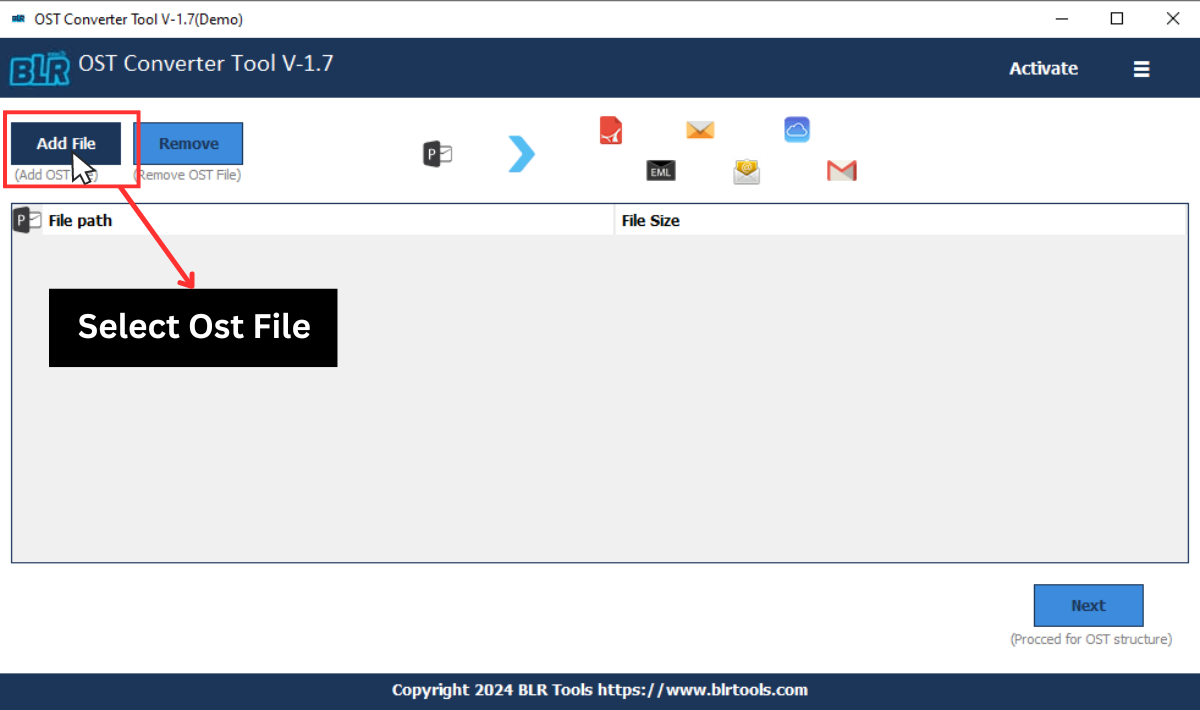
Step 1: Open this OST File Recovery Tool on your Windows.
Step 2: Then, click on the “Add File” and browse the OST file.
Step 3: After loading the file, you can see the folder structure of your OST file.
Step 4: Click the folder from which you want to recover.
Step 5: From the multiple export option choose any file format.
Step 6: Browse the targeted location and hit the Export button.
Key Features
Advanced Capabilities of BLR OST Recovery Tool
Recover OST File to PST
BLR OST Recovery Tool helps you to recover emails, contacts, calendars, etc from corrupted, inaccessible, or orphan OST file. The tool will accurately retrieve all the data with complete properties, attributes, and formatting.
Multiple Saving Options
This OST File Recovery Tool offers multiple export options that will save your corrupted OST file data into different formats. With these saving options, you can convert OST to PST, PDF, CSV, EML, and multiple formats.
Work With Oversized OST File
Large or oversized OST file cause Outlook performance to slow down or corrupt. BLR OST Recovery Tool efficiently handles large OST file effortlessly. The software will split large OST file into smaller .pst files without affecting your data.
Preview Emails Before Recovery
BLR OST Recovery Software comes with a built-in preview mode that allows users to view emails and other data from corrupted OST file. This feature helps users to view their OST file mailbox data before recovering it.
Move OST Emails to IMAP Servers
This OST File Recovery Software enables you to move emails from a damaged OST file to IMAP-supported email servers instantly. With this software feature, you can migrate OST to Office 365, Gmail, Exchange, AOL Mail, and many others.
Maintains Data integrity
With this Exchange OST Recovery Tool, you can recover emails from a corrupted OST file while maintaining complete data integrity. It ensures that original email formatting, metadata, headers, timestamps, and folder structure remain unchanged when recovering OST file data.
Minimum System Requirements
Requirements to Install BLR OST Recovery Tool
 About Product
 System Requirement
 Documents
About Product
Documents
About Product
BLR OST Recovery
| Version: | 1.7 |
| Language Supported: | English |
| Release Date: | Dec, 2025 |
System Requirement
System Requirement
| Processor: | Intel 4.2 GHz or i3 6th (2.4 GHz recommended) |
| Memory: | 4 GB minimum (2 GB minimum recommended) |
| Hard Disk: | 500 MB for installation files |
| Operating System: | Windows 11, 10, 8.1, 8; and earlier versions |
Documents
 Installation / Uninstallation
 User Manual
 Knowledge Base
Software Feature Comparison
BLR OST Recovery - Demo vs Paid
| Software Features | Trial Version | Licensed Version |
|---|---|---|
| Scan Corrupted OST File | ✔ | ✔ |
| Preview OST File Items | ✔ | ✔ |
| Large File Recovery | ✔ | ✔ |
| Split OST File | ❌ | ✔ |
| Filtering Options | ❌ | ✔ |
| Save Recover Emails | 15 Emails/folder | ✔ |
| Free Download | Buy now
|
FREQUENTLY ASKED QUESTION
Answers to Your Questions
No, there is no file-size limitation with the Exchange OST Recovery tool.
Yes, when you add the OST file, the tool previews your complete mailbox data. Select the contact folder and save data from the folder only.
Yes, with this OST File Recovery Tool, it will be easy to save emails and other data from the severely corrupted OST file.
No, there will be no data modification while recovering corrupted OST file data.
Yes, you can choose the email folders and recover the data you need.
Customer Experiences with
BLR OST Recovery Tool
Michael Warner
30.12.2025
The tool was very easy to use, even without much technical knowledge. It recovered the complete mailbox items without affecting the folder structure. Highly recommended for anyone facing OST corruption.
Sophia Morre
20.01.2026
My Exchange profile was deleted, and the only thing left was a corrupted OST file. This tool successfully recovered all my data and saved it into a PST file. Excellent performance!