BLR OST Viewer Tool
Open, Read & Analyze OST File emails, contacts, calendars, etc.
With an easy-to-use interface and precise scanning, OST file viewer tool lets you view OST file emails, attachments, folders, and metadata. This OST file Viewer tool allows you to read healthy, orphaned, or inaccessible OST files without facing any issues.
- Read OST files without an Exchange Server connectivity
- View data from corrupt, orphaned, and inaccessible OST file
- Open OST file without installing Outlook on your system
- View the OST file data in the proper hierarchy and structure
- Supports OST file from Outlook 2021, 2019, and all versions


Best Use Case Scenarios
How BLR OST Viewer Tool Helps
When Outlook Is Not Available
If there is no Outlook installed on your system and you still want to open an OST file, this tool will work. This OST file viewer will open OST file without Outlook, allowing you to access emails, contacts, calendars, and other data.
For Orphaned OST Files
When the OST file leaves the Outlook or Exchange environment, it becomes orphaned. In that case, it is impossible to read or view the OST file data. However, with the BLR OST Viewer software, you can easily view the OST file data.
No Exchange Server Connectivity
In scenarios where the Exchange Server is down, unreachable, or permanently deleted, this Outlook OST file Viewer provides a reliable solution to access OST mailbox data offline. Users can safely preview OST file emails without connecting to the Exchange Server.
What Experts Say About
BLR OST Viewer Tool
I appreciate the BLR OST Viewer as it works smoothly and allows me to access my OST file data. It helps you to access your data file without risking file integrity.
OST file viewer tool handles large and inaccessible OST files smoothly without any hassle. With this OST file viewer, you can quickly access OST file data even if Outlook is unable to open it. A reliable solution for analyzing complex OST file with ease.
How to View OST File Using
BLR OST Viewer Software
Step 1: Open the free OST Viewer Tool on your Windows.
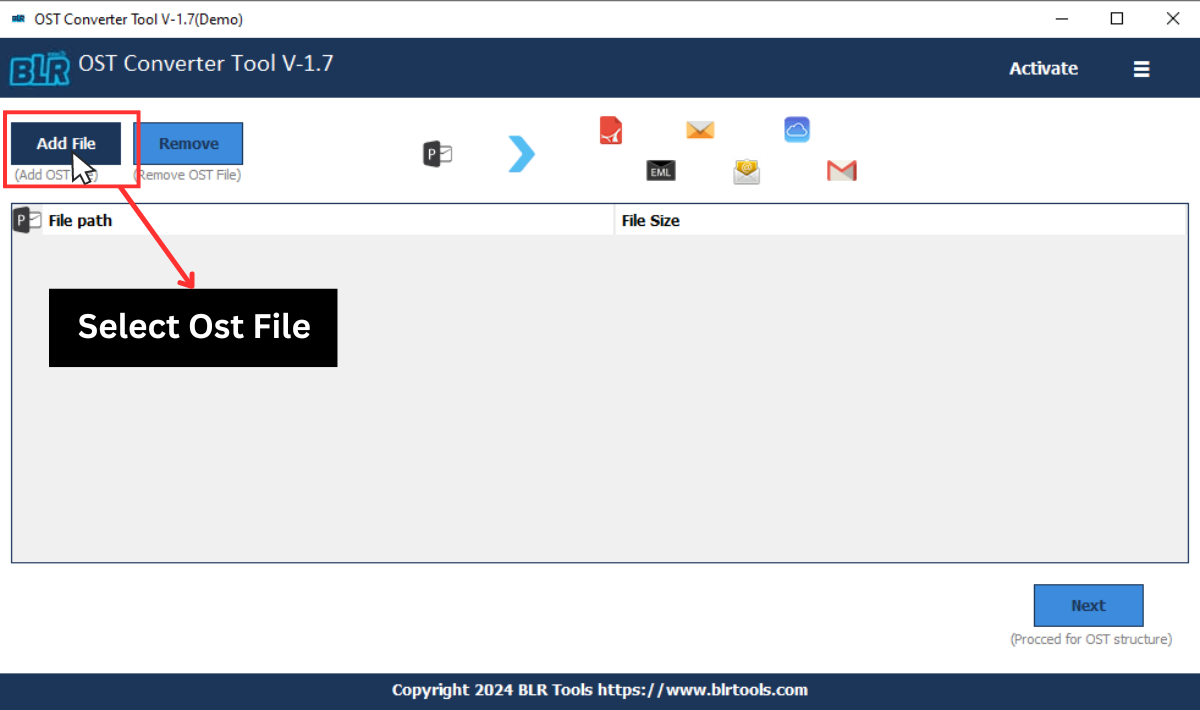
Step 2: Then, click on the “Add File” and browse the OST file.
Step 3: After loading the file, you can see the folder structure of your OST file.
Step 4: Click the folder from which you want to read emails.
Step 5: Now, double-click on the email, and read/view your email.
Step 6: Repeat the same process for all the emails or other data you want to read.
Key Features
BLR PST Viewer Benefits
Read Large OST File
BLR OST Viewer efficiently scans and opens large OST file without affecting any of your important data. Over time, data stored in the OST file can grow significantly, making it difficult to access. This tool allows smooth preview of mailbox data regardless of file size.
Supports Inaccessible OST File
When the OST file becomes inaccessible due to a deleted Outlook profile, Exchange connectivity issue, or Outlook errors, BLR OST Viewer provides an efficient solution. With this Outlook PST viewer, you can open inaccessible OST files without any hassle.
View Email Attachments
If you want to view your OST file attachments, then BLR OST Viewer enables users to preview email attachments directly. It supports common attachment formats such as documents, images, and PDFs, etc. This feature saves time by avoiding opening OST emails in Outlook.
View OST Contacts
With this OST File Viewer, you can easily view and read OST file contacts. After you load the OST file, you can see the OST file folder hierarchy. Click on the contact folder and view your contact details, including names, email addresses, phone numbers, and other associated data.
Open OST Calendar Data
The Outlook OST Viewer allows users to open and preview calendar events stored in the OST file. Users can preview calendar entries without Outlook or Exchange connectivity, making it easier to analyze mailbox activity offline.
User-Friendly Interface
With its simple and easy-to-use interface, BLR OST Viewer helps both technical and non-technical users to view OST file. Users can open OST files, browse mailbox data, and preview content without facing any complexities.
Minimum System Requirements
Requirements to Install BLR OST Viewer Tool
 About Product
 System Requirement
 Documents
About Product
Documents
About Product
BLR OST Viewer
| Version: | 1.7.1 |
| Language Supported: | English |
| Release Date: | Dec, 2025 |
System Requirement
System Requirement
| Processor: | Intel 4.2 GHz or i3 6th Gen 2.4 GHz or higher recommended |
| Memory: | 4 GB recommended (2 GB minimum) |
| Hard Disk: | 500 MB for installation files |
| Operating System: | Windows 11, 10, 8.1, 8 and earlier versions |
Documents
 Installation / Uninstallation
 User Manual
 Knowledge Base
Software Feature Comparison
BLR OST Viewer vs Paid Tools
| Software Features | OST File Viewer | OST Viewer Pro |
|---|---|---|
| View OST Files | ✔ | ✔ |
| Open OST file Without Outlook | ✔ | ✔ |
| Read Emails and Attachments | ✔ | ✔ |
| Read Contacts, Calendars, Tasks | ✔ | ✔ |
| Supports Orphaned/Inaccessible OST | ✔ | ✔ |
| Split OST File | ❌ | ✔ |
| Filtering Options | ❌ | ✔ |
| Convert OST to PST, PDF, MBOX, CSV, Other Formats | ❌ | ✔ |
| OST to IMAP Migration | ❌ | ✔ |
| Free Download | Upgrade Now
|
FREQUENTLY ASKED QUESTION
Answers to Your Questions
Yes, with this free OST viewer you can easily open/read OST file.
Yes, the software will show your emails along with attachments, inline images, and all email attributes.
Yes, this tool supports corrupted or damaged OST file without any hassle.
No, the tool will show your OST file data without making any modifications.
No, with the free OST Viewer Tool, you can only view your emails. If you want to export OST emails, then you need a paid version.
Customer Experiences with
BLR OST Viewer Tool
Christopher Lee
28.01.2026
The OST file viewer provides a structured and efficient way to access OST files without requiring Outlook. It accurately displays emails, attachments, and complete folder hierarchy while maintaining data integrity. Overall, it serves as a dependable solution for securely viewing and analyzing OST file data.
Richard Evans
20.01.2026
I’m extremely satisfied with this OST File Viewer performance. It allowed me to open emails and other data from a corrupted OST file without any Outlook or Exchange connectivity.