BLR EML Converter Tool
Smart tool to convert multiple EML Files in bulk
Trusted and secure tool to convert EML files into multiple file formats, including PST, PDF, MBOX, CSV, and many more. BLR EML Converter is designed to deliver fast, accurate, and error-free EML conversion.
- Bulk EML conversion to multiple formats with attachments at once
- Preview mode to view emails before converting EML files
- Migrate EML files into various IMAP Server accounts
- Remove duplicates based on to, from, received date, and body
- Option to convert emails without saving attachments
- Date range filter to convert specific email files


Best Use Case Scenario
When BLR EML Converter is Needed
Batch EML Conversion
With this tool, users can easily convert multiple EML files at once without any data loss. Simply add multiple files or an entire folder, choose the desired export option, and start the EML conversion process.
Migrate to IMAP Server
If you want to move your EML files into various webmail accounts, then this tool will help. The software will migrate EML to Office 365, Gmail, iCloud, and all other IMAP servers with ease. While importing emails, this tool will preserve email attributes.
Import EML to Outlook
In some situations, a user wants to move their EML files into Outlook. In that case, first they need to convert EML to PST file since the EML file is not directly supported by Outlook. After that, it is easy to import the converted data file into Outlook.
What Experts Say About
BLR EML Converter Software
The preview feature of this tool helped me accurately choose and convert only the emails I wanted. It ensures that I have complete control over the conversion process. It is a very reliable and efficient tool.
A powerful and reliable software that is designed to effortlessly convert and migrate EML files with high accuracy and efficiency.
Steps of EML Conversion
With the BLR EML Converter Tool
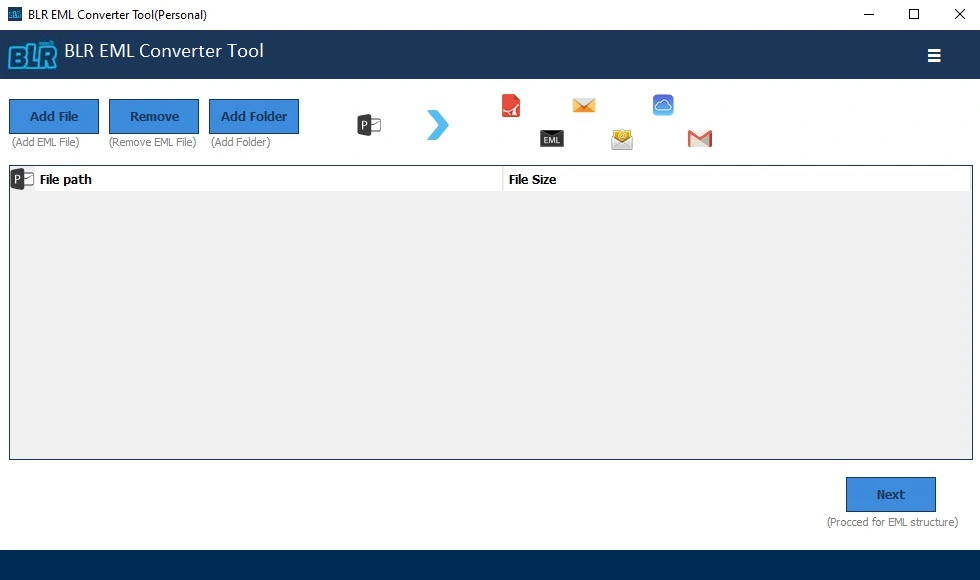
Step 1: After installing, run the BLR EML Converter on your Windows.
Step 2: To add EML files, click on the “Add File” or “Add Folders”.
Step 3: Select the folders or files if you want selective conversion.
Step 4: Choose the file format or server from multiple export options.
Step 5: Browse the destination location or login details if you choose the IMAP option.
Step 6: At last, hit the Export button to start the conversion or migration.
Feature Overview
BLR EML Converter Tool
Multiple Export Options
With this tool, there are various export options that will help you to convert EML into different formats. You can convert EML to PST, PDF, MBOX, TXT, CSV, and a few other formats. This feature helps you to access your emails on different platforms.
Direct EML Migration
With BLR EML Converter, there are other export options that help you to migrate your emails. Using this tool, you can import EML to Gmail, Office 365, Exchange, Zoho Mail, and all other IMAP server accounts.
Date Range Filter
If you want to convert emails from any particular date, then with this tool, there is a date range filter option. Set the start and end date; after that, the tool will start converting emails you receive or send from the particular time period.
Selective EML Conversion
With this tool, you can also select the emails and convert them. After you add the EML files/folders, you can choose the email file and convert it into a desired file format. In this way, it is easy to manage emails, and only important emails are converted.
Smart Preview Option
This tool includes a special preview feature that allows you to view your emails before conversion. It ensures accuracy and helps you convert only the important and required emails and avoid unwanted conversions.
Delete Duplicate Emails
The delete duplicate emails feature automatically detects and removes duplicate emails during the conversion process. This helps keep the output data clean, organized, and free from repeated emails.
Minimum System Requirements
Requirements to Install BLR EML Converter Tool
 About Product
 System Requirement
 Documents
About Product
Documents
About Product
BLR EML Converter
| Version: | 1.7 |
| Edition: | Personal, & Business, Enterprise |
| Language Supported: | English |
| Release Date: | Jan, 2026 |
System Requirement
System Requirement
| Processor: | Intel 4.2 GHz or i3 6th (2.4 GHz recommended) |
| Memory: | 4 GB minimum (2 GB minimum recommended) |
| Hard Disk: | 500 MB for installation files |
| Operating System: | Windows 11, 10, 8.1, 8; and earlier versions |
Documents
 Installation / Uninstallation
 User Manual
 Knowledge Base
Software Feature Comparison
BLR EML Converter Tool: Free vs Paid
| Software Features | Trial Version | Paid Version |
|---|---|---|
| Convert EML Emails | First 25 | ✔ |
| Dual Options to Add EML Files | ✔ | ✔ |
| Preview EML Files | ✔ | ✔ |
| Preserve Email Properties | ✔ | ✔ |
| Attachments Handling | ✔ | ✔ |
| Batch Conversion | ❌ | ✔ |
| Free Download | Buy now
|
FREQUENTLY ASKED QUESTION
Answers to Your Questions
Using this software, you can easily convert EML to PDF, CSV, MBOX, DOC, and many other file formats.
Yes, with this tool, you can convert multiple EML files at once without any data loss.
Yes, it maintains all key elements, such as sender, receiver, subject, date/time, attachments, and folder structure, so converted emails remain complete and usable.
Yes, this tool will migrate your EML files to any webmail accounts. That means you can import EML to Office 365, Gmail, Yahoo Mail, IMAP, iCloud, and others.
Yes, there is a date range filter that helps you select emails from a specific date range.
Yes, use the tool and convert EML to MBOX file. After that, you can easily import the converted data file into Thunderbird.
Once the conversion process is completed, you will get a successful conversion message along with a log report.
Customer Experiences with
BLR EML Converter Tool
Jennifer Smith
28.01.2026
I used BLR EML Converter to convert EML files into PST format, and the process was smooth and hassle-free. The software helps me to convert emails and maintain folder structure and hierarchy. It saved me a lot of time and effort. Highly recommended for anyone needing to convert EML to Outlook PST file.
James Lupin
13.01.2026
I am really impressed with this EML Converter. I was able to convert all my EML files in just a few minutes without any data loss. The interface is simple, the process is smooth, and the overall performance is very impressive. Totally worth using!